
This page was developed by the Consulting group of the Department of Statistics and Data Sciences at the University of Texas at Austin. We thank them for permission to distribute it via our web site.
31 July 1997
Usage Note: Stat-40
Copyright 1995-1997, ACITS, The University of Texas at Austin
Statistical Services, 475-9372
http://stat.utexas.edu/
Originally available online at: http://ssc.utexas.edu/consulting/answers/sas/sas43.html
Repeated Measures ANOVA Using SAS PROC GLM
This usage note describes how to run a repeated measures analysis of variance (ANOVA),
including a between-subjects variable, using the SAS GLM procedure. The document first
explains when one should use such a procedure; describes the terminology used; gives a
sample research problem; and finally, in a detailed example, shows how to use the SAS GLM
procedure.
You should already know how to write a SAS program to read an external data file and
run SAS procedures using the data. In addition, you should be familiar with basic ANOVA
methods and assumptions.
When to Use Repeated Measures ANOVA
As with any ANOVA, repeated measures ANOVA tests the equality of means. However,
repeated measures ANOVA is used when all members of a random sample are measured under a
number of different conditions. As the sample is exposed to each condition in turn, the
measurement of the dependent variable is repeated. Using a standard ANOVA in this case is
not appropriate because it fails to model the correlation between the repeated measures:
the data violate the ANOVA assumption of independence. Keep in mind that some ANOVA
designs combine repeated measures factors and nonrepeated factors. If any repeated
factor is present, then repeated measures ANOVA should be used.
This approach is used for several reasons. First, some research hypotheses require
repeated measures. Longitudinal research, for example, measures each sample member at each
of several ages. In this case, age would be a repeated factor. Second, in cases where
there is a great deal of variation between sample members, error variance estimates from
standard ANOVAs are large. Repeated measures of each sample member provides a way of
accounting for this variance, thus reducing error variance. Third, when sample members are
difficult to recruit, repeated measures designs are economical because each member is
measured under all conditions.
Repeated measures ANOVA can also be used when sample members have been matched
according to some important characteristic. Here, matched sets of sample members are
generated, with each set having the same number of members and each member of a set being
exposed to a different random level of a factor or set of factors. When sample members are
matched, measurements across conditions are treated like repeated measures in a repeated
measures ANOVA.
For example, suppose that you select a group of depressed subjects, measure their
levels of depression, and then match subjects into pairs having similar depression levels.
One subject from each matching pair is then given a treatment for depression, and
afterwards the level of depression of the entire sample is measured again. ANOVA
comparisons between the two groups for this final measure would be most efficient using a
repeated measures ANOVA. In this case, each matched pair would be treated as a single
sample member.
One should be clear about the difference between a repeated measures design and a
simple multivariate design. For both, sample members are measured on several occasions, or
trials, but in the repeated measures design, each trial represents the measurement of the
same characteristic under a different condition. For example, one can use a repeated
measures ANOVA to compare the number of oranges produced by an orange grove at years one,
two, and three. The measurement is the number of oranges, and the condition that changes
is the year. In contrast, for the multivariate design, each trial represents the
measurement of a different characteristic. You should not, for example, use a repeated
measures ANOVA to compare the number, weight, and price of oranges produced by a grove of
orange trees. The three measurements are number, weight, and price, and these do not
represent different conditions, but different qualities. It is generally inappropriate to
test for mean differences between such disparate measurements.
Statistical Terminology Used in this Document
Several terms in this document may be unfamiliar. It will be helpful for you to know
their meaning.
A sample member is called a subject.
When a dependent variable is measured repeatedly for all sample members across a set of
conditions, this set of conditions is called a within-subjects factor. The
conditions that constitute this type of factor are called trials.
When a dependent variable is measured on independent groups of sample members, where
each group is exposed to a different condition, the set of conditions is called a between-subjects
factor. The conditions that constitute this factor type are called groups.
When an analysis has both within-subjects factors and between subjects factors, it is
called a repeated measures ANOVA with between-subjects factors.
Sample Research Problem
The remainder of this document uses a detailed example to illustrate repeated measures
ANOVA. Suppose that, as a health researcher, you want to examine the impact of dietary
habit and exercise on pulse rate. To investigate these issues, you collect a sample of
individuals and group them according to their dietary preferences: meat eaters and
vegetarians. You then divide each diet category into three groups, randomly assigning each
group to one of three types of exercise: aerobic stair climbing, racquetball, and weight
training. So far, then, your design has two between-subjects (grouping) factors:
dietary preference and exercise type.
Suppose that, in addition to these between-subjects factors, you want to include a
single within-subjects factor in the analysis. Each subject’s pulse rate will be measured
at three levels of exertion: after warm-up exercises, after jogging, and after running.
Thus, intensity (of exertion) is the within-subjects factor in this design. In the
SAS syntax that appears below, this factor is labeled Intensity. The order of these
three measurements will be randomly assigned for each subject.
Note that all the factors just described can be considered fixed effects. The levels of
intensity, diet, and exercise-type were selected because you are interested in those
specific categories. In contrast, the levels of a random effect are chosen at random from
a population of possible levels. Random effects cannot be appropriately analyzed with the
method being described.
Missing Data Values and Unbalanced Designs
Cases with missing values at any trial must be dropped from the analysis. SAS PROC GLM
will automatically delete the entire observation if it has any missing data (this is
called “listwise deletion”). If an observation is deleted this way, or if the
number of group members is uneven in some other way, then the design is unbalanced.
Consider an experiment that has one between-subjects grouping factor: dietary preference.
Suppose the design incorporated 25 meat eaters and 24 vegetarians. Such a design would be
unbalanced, while a design with 25 members in each group would be balanced. Unbalanced
designs create special difficulties for the analysis of variance. If you have an
unbalanced design, then you should consult an advanced statistics text or see a
statistical consultant for more information about this topic.
Asking Research Questions
With any inferential statistical procedure, it is important to state the hypotheses of
interest clearly before undertaking any statistical analyses of the data. In this
example, then, you have carefully considered your research goals and decided that you are
interested in answers to the following questions:
Within-Subjects Main Effect
Does intensity influence pulse rate? (Does mean pulse rate change across the trials for
intensity?) This is the test for a within-subjects main effect of intensity.
Between-Subjects Main Effects
Does dietary preference influence pulse rate? (Do vegetarians have different mean pulse
rates than meat eaters?) This is the test for a between-subjects main effect of dietary
preference.
Does exercise type influence pulse rate? (Are there differences in mean pulse rates
between stair climbers, racquetball players, and weight trainers?) This is the test for a between-subjects
main effect of exercise type.
Between-Subjects Interaction Effect
Does the influence of exercise type on pulse rate depend on dietary preference? (Does
the pattern of differences between mean pulse rates for exercise-type groups change for
each dietary-preference group?) This is the test for a between-subjects interaction of
exercise type by dietary preference. Keep in mind that other formulations of this
interaction are equivalent. This hypothesis can also be expressed as “Does the
influence of dietary preference depend on exercise type?”)
Interaction hypotheses can be difficult to understand, so an example may help. You
might believe that vegetarian racquetball players have lower pulse rates than all meat
eaters and vegetarians weight-lifters and stair-climbers. In other words, you may
wonder if something unique in the combination of a vegetarian diet and racquetball
exercise produces an unusually low mean pulse rate. This pattern of differences between
pulse rates would ignore intensity trials.
Within-Subjects by Between-Subjects Interaction Effects
Does the influence of diet on pulse rate depend upon intensity? (Does the pattern of
differences between mean pulse rates for dietary-preference groups change at each
intensity trial?) This is the test for a between-subjects by within-subjects
interaction of dietary preference by intensity. You might suspect, for example, that
the mean pulse rate of meat eaters will increase more than the mean pulse rate of
vegetarians as the intensity of exercise changes.
Does the influence of exercise type on pulse rate depend upon intensity? (Does the
pattern of differences between mean pulse rates for exercise-type groups change at each
intensity trial?) This is the test for a between-subjects by within-subjects
interaction of exercise type by intensity.
Does the influence of dietary preference on pulse rate depend upon exercise type and
intensity? (Does the pattern of differences between mean pulse rates for
dietary-preference groups change for some exercise-type group and for some intensity
trial?) This is the test for a between-subjects by within-subjects interaction of
dietary preference by exercise type by intensity.
The Null Hypothesis, Alpha, and p Values
Recall that, for all of the hypotheses specified above, you test the null hypothesis of
no differences between population means. In most cases, some difference will occur
in the sample between any levels of a factor. However you want to draw conclusions not
about the sample, but about the larger population from which it was taken. F ratios and
the analysis of variance were developed to enable you to do that. A large F value yields a
correspondingly small p value. The p value is the observed significance level, or
probability of a Type 1 error: concluding that a difference between population
means exists when in fact there is no difference. This type 1 error is also known as alpha
error.
You examine the p value to determine if it meets your criterion for an acceptable level
of alpha error. You must decide on an alpha level that is acceptable to you before you
conduct each analysis. If the p value appearing on the SAS printout is larger than
your previously set alpha level, then you fail to reject the null hypothesis. On
the other hand, if your p value is smaller than your alpha level, then you reject
the null hypothesis. The alpha level you set before you conduct each hypothesis test can
be influenced by a number of factors; by convention it is usually set at 0.05.
Testing Hypotheses with PROC GLM
Throughout this document, all SAS syntax and output appear in Courier font.
Words that appear in ALL CAPITALS are keywords that must be typed exactly as
shown. Words or numbers to be supplied by the user (such as variable names) are written in
lower case (e.g., trial-1). Here is the general syntax for SAS’s GLM procedure:
PROC GLM DATA = sas-dataset-name ;
CLASS group-factor-1 group-factor-2 ... group-factor-k ;
MODEL trial-1 trial-2 ... trial-k = group-factor-1 ... group-factor-k ;
REPEATED repeated-factor-name number-of-trials / PRINTE ;
LSMEANS grouping-factor-1 group-factor-2 ... group-factor-k ;
RUN;
To make the description of analysis techniques more concrete, a repeated measures ANOVA
example on our health research data is now provided. This example includes the SAS syntax
necessary to run a repeated measures ANOVA with grouping factors, as well as a brief guide
to interpreting the output provided by SAS PROC GLM.
Recall that you have measured the pulse of your subjects at three trials, and these
three variables have been entered into a SAS dataset as Pulse1, Pulse2, and Pulse3.
Pulse1 is the pulse measurement taken at the warmup exercising trial whereas Pulse3
is the pulse measurement taken after running. The variable Diet denotes dietary
preference, with values of 1 signifying meat eaters and 2 signifying vegetarians. Finally,
the variable Exertype is the type of exercise assigned to the subjects, with 1
signifying aerobic stairs, 2 signifying racquetball, and 3 signifying weight training.
Here is a subset of the data:
EXERTYPE  PULSE1    PULSE2    PULSE3    DIET
1         112       166       215       1
1         111       166       225       1
1         89        132       189       1
1         95        134       186       2
1         66        109       150       2
1         69        119       177       2
2         125       177       241       1
2         85        117       186       1
2         97        137       185       1
2         93        151       217       2
2         77        122       178       2
2         78        119       173       2
3         81        134       205       1
3         88        133       180       1
3         88        157       224       1
3         58         99       131       2
3         85        132       186       2
3         78        110       164       2
To perform a repeated measures ANOVA with grouping factors, one that tests all of the
hypotheses described above, use the following SAS PROC GLM statements.
PROC GLM DATA = repeated ;
CLASS diet exertype ;
MODEL pulse1 pulse2 pulse3 = diet exertype diet*exertype / nouni;
REPEATED intensity 3 / PRINTE ;
LSMEANS diet exertype diet*exertype ;
RUN ;
Explanation of PROC GLM Syntax
The keywords PROC GLM are immediately followed by the DATA = option,
which tells GLM which SAS dataset the analysis will be performed on — in this case, the
dataset named “repeated”. The CLASS statement tells SAS which
between-subject variables are grouping (classification) variables.
The MODEL statement contains three variable names (pulse1, pulse2, and pulse3)
which appear on the left side of an equals sign. These represent the three response
variables which are the three levels of the within-subjects factor, intensity. On the
right side of the equals sign are the groups or between-subjects factors: diet is the
variable representing dietary preference, exertype represents exercise type, and
diet*exertype represents the interaction between diet and exertype in the population from
which the data were sampled. If you have no grouping variables, then this side of the
equals sign will be blank. The /nouni option tells SAS not to print out
univariate tests for each individual dependent variable; these particular univariate tests
do not deal with any of the hypotheses mentioned above.
Following the MODEL statement is the REPEATED statement, and intensity
is the user-supplied name for the single within-subjects factor of exertion intensity.
Since it has three levels or trials (three measurements of each subject’s pulse rate), 3
is specified after the factor name. This statement tells SAS how to interpret the list of
response variables. The /PRINTE option requests that SAS print out Mauchly’s test
of sphericity (described in more detail below).
The LSMEANS statement requests that SAS print the cell means associated with
the main effects for diet and exertype, as well as with the interaction
between diet and exertype. These means help you evaluate any patterns in
the data.
Finally, the RUN statement tells SAS to run this set of PROC GLM statements.
Interpreting the PROC GLM Output
When SAS executes this PROC GLM command, the first page of output contains
descriptive information about the analysis:
Repeated measures analysis with grouping factors
  Two betw. S"S factors, 1 within w/3 levels

General Linear Models Procedure

Class Level Information
  Class Levels Values
  DIET     2 Meat Eater       Vegetarian
  EXERTYPE 3 Aerobic Stairs   Racquetball Weight Training

Number of observations in data set = 150
Within-Subject Tests: The Univariate versus the Multivariate
Approach
The first set of tests reported by SAS is for the within-subjects effects. When there
are more than two levels of a within-subjects factor, PROC GLM prints out two different
sets of within-subjects hypothesis tests: one using the multivariate approach, the
other using the univariate approach. Generally, both sets of tests yield similar results.
Repeated measures ANOVA carries the standard set of assumptions associated with an
ordinary analysis of variance, extended to the matrix case: multivariate normality,
homogeneity of covariance matrices, and independence. Repeated measures ANOVA is robust to
violations of the first two assumptions. Violations of independence produce a nonnormal
distribution of the residuals, which results in invalid F ratios. The most common
violations of independence occur when either random selection or random assignment is not
used.
In addition to these assumptions, the univariate approach to tests of the
within-subject effects requires the assumption of sphericity, which is described in more
detail below. When sample sizes are small, the univariate approach can be more powerful,
but this is true only when the assumption of a common spherical covariance matrix has been
met.
When at least one within-subjects factor has three or more trials, SAS will run
Mauchly’s test of sphericity if the /PRINTE option is specified as part of the REPEATED
statement. If your within-subject factors fail to meet the assumption of sphericity,
then you should either use the multivariate approach or you should adjust the univariate
results by using one of the correction factors described below.
Transformed Variables
The assumption of sphericity is tested using transformed dependent variables. The
original variables representing each trial are transformed according to a set of
orthogonal contrasts. The choice of transform does not affect the outcome of the test, as
long as the transformation matrix is orthonormal.
If you do not specify a set of contrasts, a default set is used. If you choose a
nonorthogonal contrast scheme for any within-subjects factor, SAS will orthonormalize the
contrast matrix and you will not get the contrasts you ask for. The first transformed
variable, T1, is always a constant and is not used in any tests involving covariance
matrices. Thus, there will always be one less transformed variable than original
variables.
The default contrast scheme is Deviation. For this contrast scheme, each level
of the within-subjects factor is compared to the overall mean of all levels. T1
is a constant, T2 represents Pulse1-(Pulse1+Pulse2+Pulse1)/3, while T3
represents Pulse2-(Pulse1+Pulse2+Pulse3)/3. The covariance matrices have the
variances of T2 and T3 on the diagonal, and the covariance of these two
variables off the diagonal. Keep in mind that you should also have balanced cell sizes
across the between-subjects factors in the analysis: there should be equal numbers of
subjects in each between-subjects group.
Mauchly’s Sphericity Test and Epsilon Adjustment Values
The test of sphericity, when requested, immediately precedes both sets of
within-subjects tests. Although the output shows two separate tests of sphericity, the
only one of interest is the second test, which is the test of sphericity applied to the
common covariance matrix of the transformed within-subject variables. The test for the
health research dataset appears below.
Test for Sphericity: Mauchly's Criterion = 0.4069598
Chisquare Approximation = 128.56285 with 2 df
Prob > Chisquare = 0.0000

Applied to Orthogonal Components:
Test for Sphericity: Mauchly's Criterion = 0.7335312
Chisquare Approximation = 44.313583 with 2 df
Prob > Chisquare = 0.0000
Mauchly’s sphericity test examines the form of the common covariance matrix. A
spherical matrix has equal variances and covariances equal to zero. The common covariance
matrix of the transformed within-subject variables must be spherical, or the F tests and
associated p values for the univariate approach to testing within-subjects hypotheses are
invalid. If the Chi-square approximation has an associated p value less than your alpha
level, the sphericity assumption has been violated. The chi-square approximation for
this test is 44.31 with 2 df and an associated probability of less than 0.001. Since this
is less than the alpha level of 0.05, we can be confident that the data do not meet the
sphericity assumption.
For practical purposes, these issues are important only in helping you decide which
output to use, and if the output should be adjusted. If you can use the univariate output,
you may have more power to reject the null hypothesis in favor of the alternative
hypothesis. However, the univariate approach is appropriate only when the sphericity
assumption is not violated. If the sphericity assumption is violated, then in most
situations you are better off staying with the multivariate output.
An alternative to using the multivariate approach is to adjust the univariate test
degrees of freedom. SAS prints two different correction factors: the
Greenhouse-Geisser Epsilon (G-G) and the Huynh-Feldt Epsilon (H-F). Generally, the H-F
correction factor is used because the G-G correction factor has been shown to be too
conservative: it sometimes fails to detect a true difference between group means. By
default, SAS prints the adjusted p values for both the G-G and the H-F epsilon values for
each univariate F test involving a within-subjects effect. See the section of this
document entitled “Univariate Approach to Within-Subjects Tests” for more
information on this topic.
Multivariate Approach to Within-Subjects Tests
As noted above, the multivariate output is still valid even if the sphericity
assumption is not met. SAS prints the multivariate approach to testing the within-subjects
factors after Mauchly’s test of sphericity. The first multivariate test of a
within-subjects effect is the within-subjects main effect test. It examines changes
in pulse rate as a function of intensity. The null hypothesis is that the mean pulse rate
does not change across different intensities.
Manova Test Criteria and Exact F Statistics for
the Hypothesis of no INTENSIT Effect
H = Type III SS&CP Matrix for INTENSIT E = Error SS&CP Matrix
S=1 M=0 N=70.5
Statistic                Value    F      Num DF Den DF Pr > F
Wilks' Lambda            0.018601 3772.3 2      143    0.0001
Pillai's Trace           0.981399 3772.3 2      143    0.0001
Hotelling-Lawley Trace  52.7594   3772.3 2      143    0.0001
Roy's Greatest Root     52.7594   3772.3 2      143    0.0001
SAS prints four lines, each reporting a separate multivariate test statistic (Pillais',
Hotelling's, Wilks', and Roy's); the Wilk’s test is commonly
used. Notice that following the label “E = Error SS&CP Matrix“,
there are three values, S, M, and N. These are the degrees of
freedom for the multivariate statistics. Statistics such as Wilks’ Lambda are distributed
in three dimensions; thus three separate values for degrees of freedom are required to
determine a critical value. These multivariate statistics are converted to F values. In
some cases, the converted F and its degrees of freedom are approximations. When this is
not the case, a note at the bottom of the output states that the statistics are exact.
Since the F ratio for this hypothesis is very large [F(2, 143) = 3772.3, p =
.0001], you can confidently reject the null hypothesis and conclude that the pulse rate
changes with intensity in the population from which the sample was drawn.
Next SAS tests the hypothesis that dietary preference interacts with intensity.
Manova Test Criteria and Exact F Statistics for
the Hypothesis of no INTENSIT*DIET Effect

H = Type III SS&CP Matrix for INTENSIT*DIET
E = Error SS&CP Matrix
S=1 M=0 N=70.5

Statistic              Value    F      Num DF Den DF Pr > F
Wilks' Lambda          0.774461 20.822 2      143    0.0001
Pillai's Trace         0.225539 20.822 2      143    0.0001
Hotelling-Lawley Trace 0.29122  20.822 2      143    0.0001
Roy's Greatest Root    0.29122  20.822 2      143    0.0001
In this instance, the F value associated with these multivariate tests of the
interaction is high; therefore, the associated p value is low [F(2, 143) = 20.82, p
= .0001]. Like the previous example, then, you can now reject the null hypothesis and
conclude that change in mean pulse rate across intensity levels depends upon dietary
preference. This finding may complicate the interpretation of the main effects for diet
and intensity.
Next, turn your attention to the null hypothesis that exercise type will not interact
with intensity to produce different mean pulse rates. Here is the multivariate test of
this hypothesis:
Manova Test Criteria and F Approximations for
the Hypothesis of no INTENSIT*EXERTYPE Effect
  H = Type III SS&CP Matrix for INTENSIT*EXERTYPE
  E = Error SS&CP Matrix
  S=2 M=-0.5 N=70.5
Statistic              Value    F      Num DF Den DF Pr > F
Wilks' Lambda          0.976386 0.8595 4      286    0.4887
Pillai's Trace         0.023676 0.8626 4      288    0.4868
Hotelling-Lawley Trace 0.024122 0.8563 4      284    0.4906
Roy's Greatest Root    0.021115 1.5203 2      144    0.2221

NOTE: F Statistic for Roy's Greatest Root is an upper bound.
NOTE: F Statistic for Wilks' Lambda is exact.
By examining the Wilks' value for this test (.976), its associated F value,
and p value [F(4, 286) = .859, p = .489], you can conclude that any
differences between pulse rate levels do not reliably depend on intensity in conjunction
with the type of exercise the subject was assigned, in samples of this size.
Finally, SAS prints a multivariate hypothesis test of the null hypothesis of no
exercise-type by diet by intensity interaction:
Manova Test Criteria and F Approximations for
the Hypothesis of no INTENSIT*DIET*EXERTYPE Effect

  H = Type III SS&CP Matrix for INTENSIT*DIET*EXERTYPE
  E = Error SS&CP Matrix
  S=2 M=-0.5 N=70.5

Statistic              Value    F      Num DF Den DF Pr > F
Wilks' Lambda          0.983058 0.6135 4      286    0.6532
Pillai's Trace         0.017014 0.6178 4      288    0.6502
Hotelling-Lawley Trace 0.017162 0.6092 4      284    0.6563
Roy's Greatest Root    0.009598 0.691  2      144    0.5027
NOTE: F Statistic for Roy's Greatest Root is an upper bound.
NOTE: F Statistic for Wilks' Lambda is exact.
Since the F value associated with the Wilks' test [F(4, 286) = .613, p
= .653] has a p value greater than 0.05, you cannot conclude that there is an interaction
among these variables, and you retain the null hypothesis.
Between-Subjects Tests
Following the multivariate tests of significance for within-subjects effects, SAS
prints tests of the between-subjects effects. There is only one approach to testing these
effects.
General Linear Models Procedure
Repeated Measures Analysis of Variance
Tests of Hypotheses for Between Subjects Effects
Source         DF Type III SS    F Value Pr > F
DIET            1   33024.500000 45.54   0.0001
EXERTYPE        2     449.231111  0.31   0.7341
DIET*EXERTYPE   2     757.960000  0.52   0.5941
Error         144  104435.066667
The line labeled DIET reports the sum of squares, degrees of freedom, and mean
square for DIET. This mean square is the F ratio’s numerator for the test of the
diet hypothesis. This line also reports the F value and associated p value for the test of
the diet hypothesis. In this case, with a p value less than .0001, you have a
statistically significant effect (using the alpha criterion of .05 to define
“statistical significance”). You can therefore conclude that a statistically
significant difference exists between vegetarians and meat eaters on their overall pulse
rates. In other words, there is a main effect for diet. The cell means (not shown
here) show that meat eaters experience higher pulse rates than vegetarians.
The next line shows the EXERTYPE test. It is nonsignificant: F(2, 144) = .31,
p=.7341. Thus, you can conclude that the type of exercise has no statistically significant
effect on overall mean pulse rates. Finally, the test of the DIET BY EXERTYPE
interaction also shows a nonsignificant result (F(2, 144) = .52, p=.594). This
suggests that dietary preferences and type of exercise do not combine to influence
the overall average pulse rate. Recall that when an interaction effect is significant, the
pattern of cell means must be examined to determine the meaning not only of the
interaction, but also the meaning of any main effects involved in the interaction.
Finally, the line labeled Error reports the within-cells sum of squares,
degrees of freedom, and mean square. This mean square is the F ratio’s denominator for any
between-subjects hypothesis.
It is important to understand that these tests of between-subjects effects are based on
the average of the within-subject trials. For example, the pulse rate
average of all three trials of pulse rate is computed, and then this mean pulse rate for
vegetarians on this index is compared to the mean for meat eaters. As such, these tests
yield no information about within-subjects effects. If you expect important differences in
pulse rate across trials, then these between-subjects main-effect tests tests may not be
meaningful for you.
Univariate Approach to Within-Subjects Tests
While each of the within-subject effects have a separate page of multivariate-approach
output, the univariate tests are together on a single page in the standard ANOVA table
format. Those for the example data appear below:
General Linear Models Procedure
Repeated Measures Analysis of Variance

Univariate Tests of Hypotheses for Within Subject Effects

Source: INTENSIT
                                           Adj Pr > F
DF Type III SS Mean Square F Value Pr > F  G - G  H - F
2  768792.018  384396.009  5755.76 0.0001  0.0001 0.0001
Source: INTENSIT*DIET
                                           Adj Pr > F
DF Type III SS Mean Square F Value Pr > F  G - G  H - F
2  4181.493    2090.747    31.31   0.0001  0.0001 0.0001
Source: INTENSIT*EXERTYPE

                                            Adj Pr > F
DF Type III SS Mean Square F Value  Pr > F  G - G   H - F
4  310.929      77.732     1.16     0.3269  0.3251  0.3256
Source: INTENSIT*DIET*EXERTYPE
                                              Adj Pr > F
DF  Type III SS  Mean Square F Value  Pr > F  G - G   H - F
4   159.587      39.897       0.60    0.6648  0.6258  0.6329
Source: Error(INTENSIT)
DF   Type III SS  Mean Square
288  19233.973    66.785
Greenhouse-Geisser Epsilon = 0.7896
       Huynh-Feldt Epsilon = 0.8246
The sphericity assumption was violated for these data, and so these F’s and p values
are not valid. With nonspherical data either use the multivariate test results described
earlier or correct the univariate tests results. These corrected univariate p values
appear under the G - G and H - F headers in the output shown above. Note
that in this case, the univariate approach agrees with the multivariate approach that
there is a statistically significant within-subjects main effect for intensity, as well as
a statistically significant interaction between diet and intensity.
Understanding the Results
To interpret a significant interaction, examine the cell means and standard deviations
(not shown here) produced by the LSMEANS statement. By plotting these cell means (easily
done by hand), you realize first that the mean pulse rate increases across trials: this is
the within-subject effect. Further, it’s clear that vegetarians have a lower average pulse
rate than do meat eaters at every trial: this is the diet main effect.
Then looking closer, you see that this difference is different at each trial.
This is the result of the diet by intensity interaction. As the subjects experience more
intense exertion, the average pulse rate of the meat eaters increases more than that of
the vegetarians. A graph of the cell sample averages shown below illustrates this point.
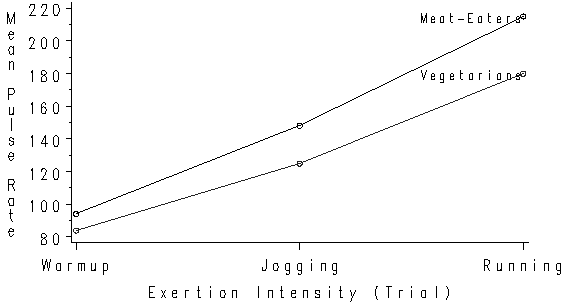
In this graph, the cell averages are collapsed across the exertype variable with the
diet variable defining the two separate lines shown in the graph. This is justified since
exertype, and all its interactions, are nonsignificant. The mean pulse rate is displayed
on the Y-axis labeled “Pulse Rate”. Exertion intensity defines the X-axis,
labeled “Intensity (Trials)”. Recall that this factor is the within-subjects
factor. The lower line shows vegetarian subjects’ average pulse rates, and the upper line
shows the meat-eating subjects’ average pulse rates, at the three exertion intensities.
The main effect for diet is interpretable in this instance because the interaction is
not complex enough to qualify the main effect. Not all interactions are this simple,
however. If you are uncertain as to whether you have an interaction which qualifies a main
effect, you should see a statistical consultant.
It is clear from the graph that the main effect for intensity is much stronger than
that for the interaction. For both diet groups, the mean pulse rate after jogging
increased about 40 points beyond the rate after warmup exercises, and increased another
(roughly) 50 points after running. The main effect for diet is reflected in the fact that
meat-eaters had a mean pulse rate roughly 10 to 20 points higher than that for
vegetarians. The interaction shows this difference between meat eaters and vegetarians
increases with exertion intensity. Thus you might want to conclude that the effects for
intensity and diet are practically as well as statistically significant, while the
interaction between these two variables is too small to have any practical significance.
Reference Materials
The following references can be helpful in conducting repeated measures analysis of
variance in SAS.
SAS/STAT User’s Guide, Version 6, Fourth Edition, Volume1 and Volume 2, Cary NC:
SAS Institute Inc., 1989.
DiIorio, Frank C., SAS Applications and Programming: A Gentle Introduction,
Belmont CA, Duxbury Press, 1991.
Stevens, James P., Applied Multivariate Statistics for the Social Sciences,
Third Edition, Mahway NJ, Lawrence Erlbaum Associates, Inc., 1996.
This page was developed by the Consulting group of the Division of Statistics and Scientific Computing at the University of Texas at Austin. We thank them for permission to distribute it via our web site.
31 July 1997
Usage Note: Stat-40
Copyright 1995-1997, ACITS, The University of Texas at Austin
Statistical Services, 475-9372
http://ssc.utexas.edu/
Originally available online at: http://ssc.utexas.edu/consulting/answers/sas/sas43.html