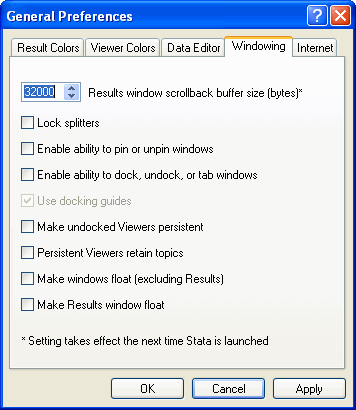
In Stata, the Results window holds up to 32000 bytes of
information (output), after that, older output at the top of the
buffer is replaced by new output when it appears at the bottom of
the Results window. You may want to increase the size of the scroll
buffer so that output is retained for longer. On all platforms you can change
the scroll buffer size using the command line. In windows, you also have the
option of using the menus.
Changing the scroll buffer size using the command line
Suppose you wanted the results window to hold up to 300,000 bytes, you
can use the following command:
set scrollbufsize 300000
(set scrollbufsize will take effect the next time you launch Stata)
As the message indicates, the setting will not take effect until the next time you
launch Stata. However, that setting will be remembered every time you launch Stata from
that point forward.
Changing the scroll buffer size using the menu system
If you are using a windows machine, you can also use the menu system
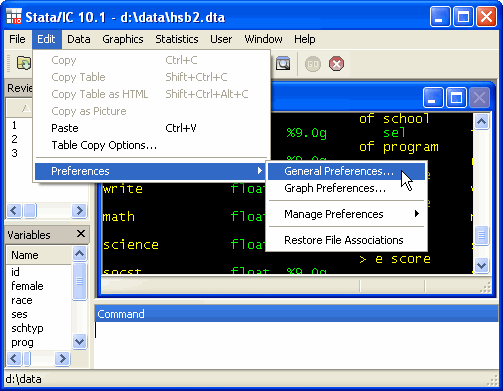
to increase the size of the scroll buffer. To access the dialogue box with this
setting, go to Edit
> Preferences > General Preferences…, as shown below.
When the General Preferences dialog box appears you will need to move from
the Result Colors tab to the Windowing tab. At the top of the Windowing tab is
the option to change the size of the scrollback buffer, increase this
value to increase the amount of output that accumulates in the buffer of
the Results Window.