
We use the following little data set to illustrate how to count
up the number of missing values for character variables with SPSS, SAS and Stata.
           id    female      race       ses    schtype       prg
  1.        1         1         1         3        pub         1
  2.        2         0         1         2        pub         2
  3.        3         0         3         2                    3
  4.        4         0         .         2        pub         .
  5.        5         0         2         2        pub         2
  6.        6         1         2         1        pub         2
  7.        7         0         .         .                    .
  8.        8         1         1         2        pub         1
  9.        9         1         .         .        pub         1
 10.       10         0         1         2        pub         1
 11.       11         1         1         1                    1
 12.       12         0         1         2        pri         1
 13.       13         0         1         .        pub         1
 14.       14         0         1         1                    .
 15.       15         1         .         2        pub         1
 16.       16         1         1         3        pub         1
SPSS
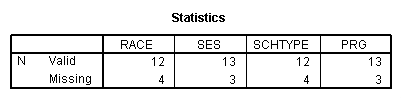
In SPSS it is easy to request the number of missing and
non-missing values for character variables. We can use the frequencies
command to request frequencies for numeric and character variables and use the
/format=notable
subcommand to suppress the display of the frequency tables, leaving us with a concise
report of the number of missing and non-missing values for each variable (see below).
FREQUENCIES VARIABLES=RACE SES SCHTYPE PRG
  /FORMAT=NOTABLE
  /ORDER= ANALYSIS .
SAS
In SAS, we have to go to a little extra effort to get the number
of missing and non-missing values for character variables. We can use
proc format to make a format for character variable to be either
"nomissing" or "missing" and then use that format with proc freq as
illustrated below. We then get a concise table showing us the number of missing and
nonmissing for the variable schtype.
proc format;
 value $miss " "="missing"
 other="nomissing";
run;

proc freq data=temp;
  tables schtype / missing;
  format schtype $miss.;
run;
Here is the output.
| SCHTYPE | Frequency | Percent | Cumulative Frequency |
Cumulative Percent |
| missing | 4 | 25.00 | 4 | 25.00 |
| nomissing | 12 | 75.00 | 16 | 100.00 |
Stata
We have created a small Stata program called tabmiss
that counts the number of missing values in both numeric and character variables.
You can download tabmiss by typing search tabmiss (see
How can I use the search command to search for programs and get additional
help? for more information about using search).
Then you can run
tabmiss for one or more variables as illustrated below.
tabmiss  schtype

    schtype |      Freq.     Percent        Cum.
------------+-----------------------------------
  nomissing |         12       75.00       75.00
    missing |          4       25.00      100.00
------------+-----------------------------------
      Total |         16      100.00