
Chapter Outline
2.0 Regression Diagnostics
2.1 Unusual and Influential data
2.2 Tests on Normality of Residuals
2.3 Tests on Nonconstant Error of Variance
2.4 Tests on Multicollinearity
2.5 Tests on Nonlinearity
2.6 Model Specification
2.7 Issues of Independence
2.8 Summary
2.9 For more information
2.0 Regression Diagnostics
In our last chapter, we learned how to do ordinary linear regression with
SAS,
concluding with methods for examining the distribution of variables to check for
non-normally distributed variables as a first look at checking assumptions in regression.
Without verifying that your data have met the regression assumptions, your results may
be misleading. This chapter will explore how you can use SAS to test whether your
data meet the assumptions of linear regression. In particular, we will consider the
following assumptions.
- Linearity – the relationships between the predictors and the outcome variable should be
linear - Normality – the errors should be normally distributed – technically normality is
necessary only for the t-tests to be valid, estimation of the coefficients only requires
that the errors be identically and independently distributed - Homogeneity of variance (homoscedasticity) – the error variance should be constant
- Independence – the errors associated with one observation are not correlated with the
errors of any other observation - Errors in variables – predictor variables are measured without error (we will cover this
in Chapter 4) - Model specification – the model should be properly specified (including all relevant
variables, and excluding irrelevant variables)
Additionally, there are issues that can arise during the analysis that, while
strictly
speaking, are not assumptions of regression, are none the less, of great concern to
regression analysts.
- Influence – individual observations that exert undue influence on the coefficients
- Collinearity – predictors that are highly collinear, i.e. linearly
related, can cause problems in estimating the regression coefficients.
Many graphical methods and numerical tests have been developed over the years for
regression diagnostics. In this chapter, we will explore these
methods and show how to verify
regression assumptions and detect potential problems using SAS.
2.1 Unusual and influential data
A single observation that is substantially different from all other observations can
make a large difference in the results of your regression analysis. If a single
observation (or small group of observations) substantially changes your results, you would
want to know about this and investigate further. There are three ways that an
observation can be unusual.
Outliers: In linear regression, an outlier is an observation with large
residual. In other words, it is an observation whose dependent-variable value is unusual
given its values on the predictor variables. An outlier may indicate a sample peculiarity
or may indicate a data entry error or other problem.
Leverage: An observation with an extreme value on a predictor variable is called
a point with high leverage. Leverage is a measure of how far an observation
deviates from the mean of that variable. These leverage points can have an effect on the estimate of
regression coefficients.
Influence: An observation is said to be influential if removing the observation
substantially changes the estimate of coefficients. Influence can be thought of as the
product of leverage and outlierness.
How can we identify these three types of observations? Let’s look at an example dataset
called crime. This dataset appears in Statistical Methods for Social
Sciences, Third Edition by Alan Agresti and Barbara Finlay (Prentice Hall, 1997). The
variables are state id (sid), state name (state), violent crimes per 100,000
people (crime), murders per 1,000,000 (murder), the percent of the
population living in metropolitan areas (pctmetro), the percent of the population
that is white (pctwhite), percent of population with a high school education or
above (pcths), percent of population living under poverty line (poverty),
and percent of population that are single parents (single). Below
we use proc contents and proc means to learn more about this data
file.
proc contents data="c:sasregcrime";
run;
The CONTENTS Procedure

Data Set Name: c:sasregcrime                         Observations:         51
Member Type:   DATA                                     Variables:            9
Engine:        V8                                       Indexes:              0
Created:       4:58 Saturday, January 9, 1960           Observation Length:   63
Last Modified: 4:58 Saturday, January 9, 1960           Deleted Observations: 0
Protection:                                             Compressed:           NO
Data Set Type:                                          Sorted:               NO
Label:

< some output omitted to save space>

  -----Alphabetic List of Variables and Attributes-----

#    Variable    Type    Len    Pos    Label
---------------------------------------------------------
3    crime       Num       4      8    violent crime rate
4    murder      Num       8     12    murder rate
7    pcths       Num       8     36    pct hs graduates
5    pctmetro    Num       8     20    pct metropolitan
6    pctwhite    Num       8     28    pct white
8    poverty     Num       8     44    pct poverty
1    sid         Num       8      0
9    single      Num       8     52    pct single parent
2    state       Char      3     60
proc means data="c:sasregcrime";
  var crime murder pctmetro pctwhite pcths poverty single;
run;
The MEANS Procedure

Variable   Label                 N           Mean        Std Dev        Minimum
-------------------------------------------------------------------------------
crime      violent crime rate   51    612.8431373    441.1003229     82.0000000
murder     murder rate          51      8.7274510     10.7175758      1.6000000
pctmetro   pct metropolitan     51     67.3901959     21.9571331     24.0000000
pctwhite   pct white            51     84.1156860     13.2583917     31.7999992
pcths      pct hs graduates     51     76.2235293      5.5920866     64.3000031
poverty    pct poverty          51     14.2588235      4.5842416      8.0000000
single     pct single parent    51     11.3254902      2.1214942      8.3999996
-------------------------------------------------------------------------------

Variable   Label                     Maximum
--------------------------------------------
crime      violent crime rate        2922.00
murder     murder rate            78.5000000
pctmetro   pct metropolitan      100.0000000
pctwhite   pct white              98.5000000
pcths      pct hs graduates       86.5999985
poverty    pct poverty            26.3999996
single     pct single parent      22.1000004
--------------------------------------------
Let’s say that we want to predict crime by pctmetro, poverty, and single. That is to say, we want to build a linear regression model between the response
variable crime and the independent variables pctmetro, poverty and single.
We will first look at the scatter plots of crime against each of the predictor variables
before the regression analysis so we will have some ideas about potential problems. We can
create a scatterplot matrix of these variables as shown below.
proc insight data="c:sasregcrime";
  scatter crime pctmetro poverty single*
          crime pctmetro poverty single;
run;
quit;
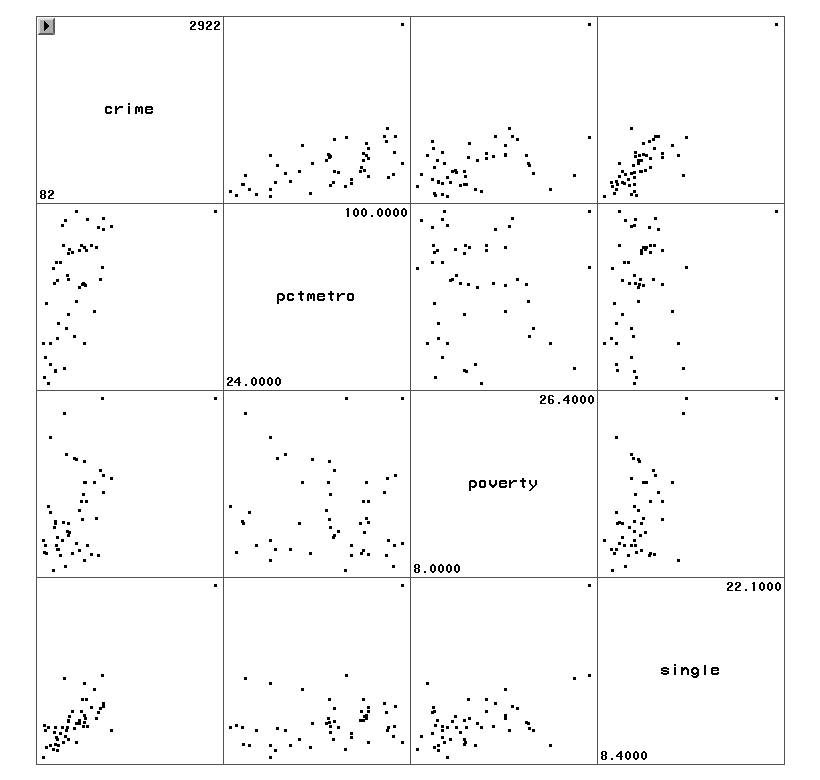
The graphs of crime with other variables show some potential problems.
In every plot, we see a data point that is far away from the rest of the data
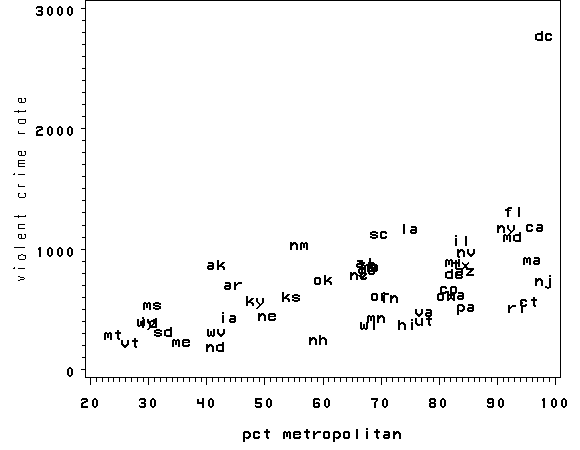
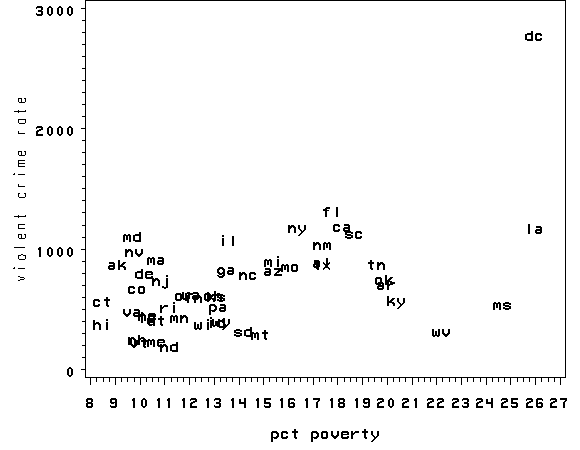
points. Let’s make individual graphs of crime with pctmetro and poverty and single
so we can get a better view of these scatterplots. We will add the pointlabel
= ("#state") option in the symbol statement to plot the state name instead of a point.
goptions reset=all;
axis1 label=(r=0 a=90);
symbol1 pointlabel = ("#state") font=simplex value=none;
proc gplot data="c:sasregcrime";
  plot crime*pctmetro=1 / vaxis=axis1;
run;
quit;
proc gplot data="c:sasregcrime";
  plot crime*poverty=1 / vaxis=axis1;
run;
quit;
proc gplot data="c:sasregcrime";
  plot crime*single=1 / vaxis=axis1;
run;
quit;
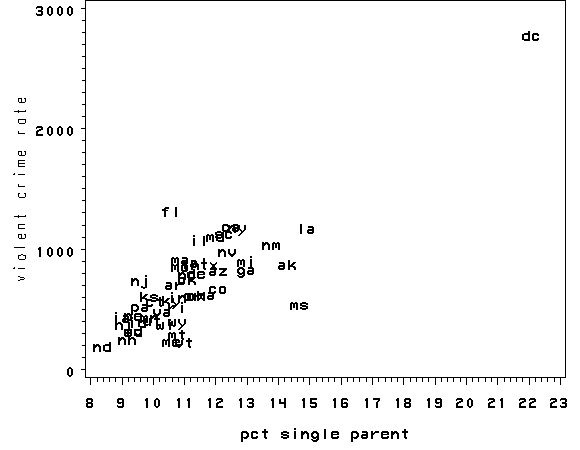
All the scatter plots suggest that the observation for state = dc is a point
that requires extra attention since it stands out away from all of the other points. We
will keep it in mind when we do our regression analysis.
Now let’s try the regression command predicting crime from pctmetro, poverty
and single. We will go step-by-step to identify all the potentially unusual
or influential points afterwards. We will output several statistics that we
will need for the next few analyses to a dataset called crime1res, and we
will explain each statistic in turn. These statistics include the
studentized residual (called r), leverage (called lev), Cook’s D
(called cd) and DFFITS (called dffit). We are requesting all
of these statistics now so that they can be placed in a single dataset that we
will use for the next several examples. Otherwise, we could have to rerun
the proc reg each time we wanted a new statistic and save that statistic
to another output data file.
proc reg data="c:sasregcrime";
  model crime=pctmetro poverty single;
  output out=crime1res(keep=sid state crime pctmetro poverty single
                       r lev cd dffit)
                       rstudent=r h=lev cookd=cd dffits=dffit;
run;
quit;
The REG Procedure
Model: MODEL1
Dependent Variable: crime violent crime rate

                             Analysis of Variance

                                    Sum of           Mean
Source                   DF        Squares         Square    F Value    Pr > F

Model                     3        8170480        2723493      82.16    <.0001
Error                    47        1557995          33149
Corrected Total          50        9728475


Root MSE            182.06817    R-Square     0.8399
Dependent Mean      612.84314    Adj R-Sq     0.8296
Coeff Var            29.70877

                             Parameter Estimates

                                     Parameter     Standard
Variable   Label               DF     Estimate        Error  t Value  Pr > |t|

Intercept  Intercept            1  -1666.43589    147.85195   -11.27    <.0001
pctmetro   pct metropolitan     1      7.82893      1.25470     6.24    <.0001
poverty    pct poverty          1     17.68024      6.94093     2.55    0.0142
single     pct single parent    1    132.40805     15.50322     8.54    <.0001
Let’s examine the studentized residuals as a first means for identifying outliers.
We requested the studentized residuals in the above regression in the output
statement and named them r. We can choose any name
we like as long as it is a legal SAS variable name. Studentized residuals are a type of
standardized residual that can be used to identify outliers.
Let’s examine the residuals with a stem and leaf plot. We see three residuals that
stick out, -3.57, 2.62 and 3.77.
proc univariate data=crime1res plots plotsize=30;
  var r;
run;
The UNIVARIATE Procedure
Variable:  r  (Studentized Residual without Current Obs)

                            Moments

N                          51    Sum Weights                 51
Mean                0.0184024    Sum Observations    0.93852247
Std Deviation       1.1331258    Variance            1.28397408
Skewness            0.2243412    Kurtosis            3.05611851
Uncorrected SS      64.215975    Corrected SS         64.198704
Coeff Variation    6157.48877    Std Error Mean      0.15866935

              Basic Statistical Measures

    Location                    Variability

Mean     0.018402     Std Deviation            1.13313
Median   0.052616     Variance                 1.28397
Mode      .           Range                    7.33664
                      Interquartile Range      1.19867

           Tests for Location: Mu0=0

Test           -Statistic-    -----p Value------

Student's t    t   0.11598    Pr > |t|    0.9081
Sign           M       0.5    Pr >= |M|   1.0000
Signed Rank    S        -1    Pr >= |S|   0.9926

Quantiles (Definition 5)

Quantile        Estimate

100% Max       3.7658467
99%            3.7658467
95%            1.5896441
90%            1.0767182
75% Q3         0.6374511
50% Median     0.0526162
25% Q1        -0.5612179
10%           -1.1293398
5%            -1.6855980
1%            -3.5707892
0% Min        -3.5707892

           Extreme Observations

------Lowest-----        -----Highest-----

   Value      Obs           Value      Obs

-3.57079       25         1.15170       14
-1.83858       18         1.29348       13
-1.68560       39         1.58964       12
-1.30392       47         2.61952        9
-1.14833       35         3.76585       51

   Stem Leaf                     #  Boxplot
      3 8                        1     0
      3
      2 6                        1     0
      2
      1 6                        1     |
      1 000123                   6     |
      0 5566788                  7  +-----+
      0 1111333344              10  *--+--*
     -0 4433210                  7  |     |
     -0 9976655555              10  +-----+
     -1 31100                    5     |
     -1 87                       2     |
     -2
     -2
     -3
     -3 6                        1     0
        ----+----+----+----+

                       Normal Probability Plot
    3.75+                                                *
        |
        |                                            *  ++++
    2.25+                                           ++++
        |                                       ++*+
        |                                  +**** *
    0.75+                              +****
        |                         *******
        |                    ******
   -0.75+               *****+
        |          * ****+
        |      * +*++
   -2.25+   +++++
        |+++
        |
   -3.75+  *
         +----+----+----+----+----+----+----+----+----+----+
             -2        -1         0        +1        +2
The stem and leaf display helps us see some potential outliers, but we cannot see
which state (which observations) are potential outliers. Let’s sort the data
on the residuals and show the 10 largest and 10 smallest residuals along with the state id
and state name.
proc sort data=crime1res;
  by r;
run;

proc print data=crime1res(obs=10);
run;
Obs    sid    state        r

  1     25     ms      -3.57079
  2     18     la      -1.83858
  3     39     ri      -1.68560
  4     47     wa      -1.30392
  5     35     oh      -1.14833
  6     48     wi      -1.12934
  7      6     co      -1.04495
  8     22     mi      -1.02273
  9      4     az      -0.86992
 10     44     ut      -0.85205
proc print data=crime1res(firstobs=42 obs=51);
 var sid state r;
run;
Obs    sid    state       r

 42     24     mo      0.82117
 43     20     md      1.01299
 44     29     ne      1.02887
 45     40     sc      1.03034
 46     16     ks      1.07672
 47     14     il      1.15170
 48     13     id      1.29348
 49     12     ia      1.58964
 50      9     fl      2.61952
 51     51     dc      3.76585
We should pay attention to studentized residuals that exceed +2 or -2, and get even
more concerned about residuals that exceed +2.5 or -2.5 and even yet more concerned about
residuals that exceed +3 or -3. These results show that DC and MS are the most
worrisome observations, followed by FL.
Let’s show all of the variables in our regression where the studentized residual
exceeds +2 or -2, i.e., where the absolute value of the residual exceeds 2. We see
the data for the three potential outliers we identified, namely Florida, Mississippi and
Washington D.C. Looking carefully at these three observations, we couldn’t find any data
entry errors, though we may want to do another regression analysis with the extreme point
such as DC deleted. We will return to this issue later.
proc print data=crime1res;
  var r crime pctmetro poverty single;
  where abs(r)>2;
run;
Obs        r       crime    pctmetro    poverty     single

  1    -3.57079      434      30.700    24.7000    14.7000
 50     2.61952     1206      93.000    17.8000    10.6000
 51     3.76585     2922     100.000    26.4000    22.1000
Now let’s look at the leverage’s to identify observations that will have
potential great influence on regression coefficient estimates.
proc univariate data=crime1res plots plotsize=30;
  var lev;
run;
The UNIVARIATE Procedure
Variable:  lev  (Leverage)

                            Moments

N                          51    Sum Weights                 51
Mean               0.07843137    Sum Observations             4
Std Deviation       0.0802847    Variance            0.00644563
Skewness           4.16424136    Kurtosis             21.514892
Uncorrected SS     0.63600716    Corrected SS        0.32228167
Coeff Variation    102.362995    Std Error Mean      0.01124211

              Basic Statistical Measures

    Location                    Variability

Mean     0.078431     Std Deviation            0.08028
Median   0.061847     Variance                 0.00645
Mode      .           Range                    0.51632
                      Interquartile Range      0.04766

           Tests for Location: Mu0=0

Test           -Statistic-    -----p Value------

Student's t    t  6.976572    Pr > |t|    <.0001
Sign           M      25.5    Pr >= |M|   <.0001
Signed Rank    S       663    Pr >= |S|   <.0001

Quantiles (Definition 5)

Quantile        Estimate

100% Max       0.5363830
99%            0.5363830
95%            0.1910120
90%            0.1362576
75% Q3         0.0851089
50% Median     0.0618474
25% Q1         0.0374442
10%            0.0292452
5%             0.0242659
1%             0.0200613
0% Min         0.0200613

             Extreme Observations

-------Lowest------        ------Highest-----

     Value      Obs            Value      Obs

 0.0200613       38         0.165277        2
 0.0241210        6         0.180201       15
 0.0242659       22         0.191012        1
 0.0276638       17         0.260676       32
 0.0287552        5         0.536383       51

   Stem Leaf                     #  Boxplot
     52 6                        1     *
     50
     48
     46
     44
     42
     40
     38
     36
     34
     32
     30
     28
     26 1                        1     *
     24
     22
     20
     18 01                       2     0
     16 5                        1     0
     14
     12 6                        1     |
     10 02                       2     |
      8 2355515                  7  +-----+
      6 0123344722366           13  *--+--*
      4 35567907                 8  |     |
      2 044899112245789         15  +-----+
        ----+----+----+----+
    Multiply Stem.Leaf by 10**-2

                       Normal Probability Plot
    0.53+                                                *
        |
        |
        |
        |
    0.43+
        |
        |
        |
        |
    0.33+
        |
        |
        |                                            *   +++
        |                                              ++
    0.23+                                           +++
        |                                         ++
        |                                      ++**
        |                                    ++*
        |                                 +++
    0.13+                               ++    *
        |                            +++     *
        |                          ++   *****
        |                       +*******
        |                    *****
    0.03+  *   *  ** ********+
         +----+----+----+----+----+----+----+----+----+----+
             -2        -1         0        +1        +2
proc sort data=crime1res;
  by lev;
run;

proc print data=crime1res (firstobs=42 obs=51);
  var lev state;
run;
Obs      lev      state

 42    0.09114     ky
 43    0.09478     nj
 44    0.09983     mt
 45    0.10220     fl
 46    0.13626     vt
 47    0.16528     la
 48    0.18020     wv
 49    0.19101     ms
 50    0.26068     ak
 51    0.53638     dc
Generally, a point with leverage greater than (2k+2)/n should be carefully
examined, where k is the number of predictors and n is the number of
observations. In our example this works out to (2*3+2)/51 = .15686275,
so we can do the following.
proc print data=crime1res;
  var crime pctmetro poverty single state;
  where lev > .156;
run;
Obs    crime    pctmetro    poverty     single    state

 47     1062      75.000    26.4000    14.9000     la
 48      208      41.800    22.2000     9.4000     wv
 49      434      30.700    24.7000    14.7000     ms
 50      761      41.800     9.1000    14.3000     ak
 51     2922     100.000    26.4000    22.1000     dc
As we have seen, DC is an observation that both has a large residual and large
leverage. Such points are potentially the most influential. We can make a plot
that shows the leverage by the residual squared and look for observations that are jointly
high on both of these measures. We can do this using a leverage versus residual-squared plot. Using residual
squared instead of residual itself, the graph is restricted to the first
quadrant and the relative positions of data points are preserved. This is a quick way of checking potential influential observations and outliers at the
same time. Both types of points are of great concern for us.
proc sql;
 create table crimeres5 as
 select *, r**2/sum(r) as rsquared
 from crime1res;
quit;

goptions reset=all;
axis1 label=(r=0 a=90);
symbol1 pointlabel = ("#state") font=simplex value=none;
proc gplot data=crimeres5;
  plot lev*rsquared / vaxis=axis1;
run;
quit;
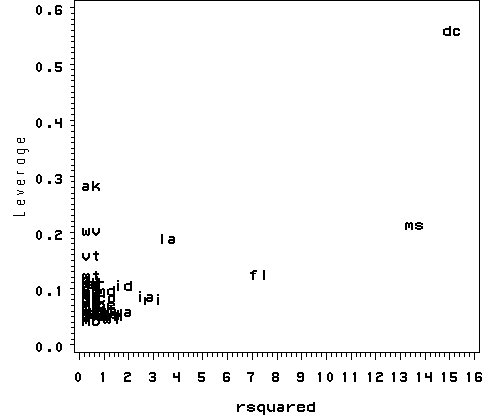
The point for DC catches our attention having both the highest residual
squared and highest leverage, suggesting it could be very influential. The point
for MS has almost as large a residual squared, but does not have the same
leverage. We’ll look at those
observations more carefully by listing them below.
proc print data="c:sasregcrime";
  where state="dc" or state="ms";
  var state crime pctmetro poverty single;
run;
Obs    state    crime    pctmetro    poverty     single

 25     ms        434      30.700    24.7000    14.7000
 51     dc       2922     100.000    26.4000    22.1000
Now let’s move on to overall measures of influence. Specifically, let’s look at Cook’s D
and DFITS. These measures both combine information on the residual and leverage.
Cook’s D and DFITS are very similar except that they scale differently, but they give us
similar answers.
The lowest value that Cook’s D can assume is zero, and the higher the Cook’s D is, the
more influential the point is. The conventional cut-off point is 4/n. We can list any
observation above the cut-off point by doing the following. We do see that the Cook’s
D for DC is by far the largest.
proc print data=crime1res;
  where cd > (4/51);
  var crime pctmetro poverty single state cd;
run;
Obs    crime    pctmetro    poverty     single    state       cd

 45     1206      93.000    17.8000    10.6000     fl      0.17363
 47     1062      75.000    26.4000    14.9000     la      0.15926
 49      434      30.700    24.7000    14.7000     ms      0.60211
 51     2922     100.000    26.4000    22.1000     dc      3.20343
Now let’s take a look at DFITS. The conventional cut-off point for DFITS is 2*sqrt(k/n).
DFITS can be either positive or negative, with numbers close to zero corresponding to the
points with small or zero influence. As we see, DFITS also indicates that DC is, by
far, the most influential observation.
proc print data=crime1res;
  where abs(dffit)> (2*sqrt(3/51));
  var crime pctmetro poverty single state dffit;
run;
Obs    crime    pctmetro    poverty     single    state      dffit

 45     1206      93.000    17.8000    10.6000     fl       0.88382
 47     1062      75.000    26.4000    14.9000     la      -0.81812
 49      434      30.700    24.7000    14.7000     ms      -1.73510
 51     2922     100.000    26.4000    22.1000     dc       4.05061
The above measures are general measures of influence. You can also consider more
specific measures of influence that assess how each coefficient is changed by deleting
the observation. This measure is called DFBETA and is created for each of
the predictors. Apparently this is more computationally intensive than summary
statistics such as Cook’s D because the more predictors a model has, the more
computation it may involve. We can restrict our attention to only those
predictors that we are most concerned with and to see how well behaved
those predictors are. In SAS, we need to use the ods output OutStatistics
statement to produce the DFBETAs for each of
the predictors. The names for the new variables created are chosen by SAS automatically
and begin with DFB_.
proc reg data="c:sasregcrime";
  model crime=pctmetro poverty single / influence;
  ods output OutputStatistics=crimedfbetas;
  id state;
run;
quit;
< output omitted >
This created three variables, DFB_pctmetro, DFB_poverty and DFB_single.
Let’s look at the first 5 values.
proc print data=crimedfbetas (obs=5);
  var state DFB_pctmetro DFB_poverty DFB_single;
run;
                  DFB_          DFB_        DFB_
Obs    state    pctmetro     poverty      single

  1     ak       -0.1062     -0.1313      0.1452
  2     al        0.0124      0.0553     -0.0275
  3     ar       -0.0687      0.1753     -0.1053
  4     az       -0.0948     -0.0309      0.0012
  5     ca        0.0126      0.0088     -0.0036
The value for DFB_single for Alaska is 0.14, which means that by being
included in the analysis (as compared to being excluded), Alaska increases the coefficient for single
by 0.14
standard errors, i.e., 0.14 times the standard error for BSingle or by (0.14 *
15.5). Because the inclusion of an observation could either contribute to an
increase or decrease in a
regression coefficient, DFBETAs can be either positive or negative. A DFBETA value
in excess of 2/sqrt(n) merits further investigation. In this example, we
would be concerned about absolute values in excess of 2/sqrt(51) or 0.28.
We can plot all three DFBETA values against the state id in one graph shown below. We add
a line at 0.28 and -0.28 to help us see potentially troublesome observations. We see
the largest value is about 3.0 for DFsingle.
data crimedfbetas1;
 set crimedfbetas;
 rename HatDiagonal=lev;
run;

proc sort data=crimedfbetas1;
 by lev;

proc sort data=crime1res;
 by lev;
run;

data crimedfbetas2;
 merge crime1res crimedfbetas1;
 by lev;
run;

goptions reset=all;
symbol1 v=circle c=red;
symbol2 v=plus c=green;
symbol3 v=star c=blue;
axis1 order=(1 51);
axis2 order=(-1 to 3.5 by .5);
proc gplot data=crimedfbetas2;
  plot DFB_pctmetro*sid=1 DFB_poverty*sid=2 DFB_single*sid=3
  / overlay haxis=axis1 vaxis=axis2 vref=-.28 .28;
run;
quit;
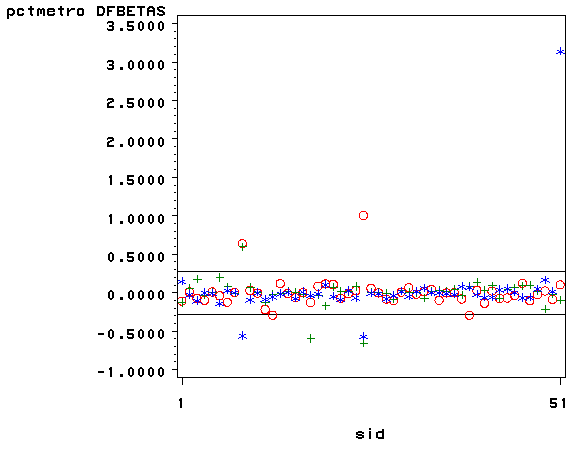
We can repeat this graph with the pointlabel = ("#state") option
on the symbol1 statement to label the
points. With the graph above we can identify which DFBeta is a problem, and with the graph
below we can associate that observation with the state that it originates from.
goptions reset=all;
axis1 label=(r=0 a=90);
symbol1 pointlabel = ("#state") font=simplex value=none;
proc gplot data=crimedfbetas2;
  plot DFB_pctmetro*sid=1 DFB_poverty*sid=2 DFB_single*sid=3
  / overlay vaxis=axis1 vref=-.28 .28;
run;
quit;
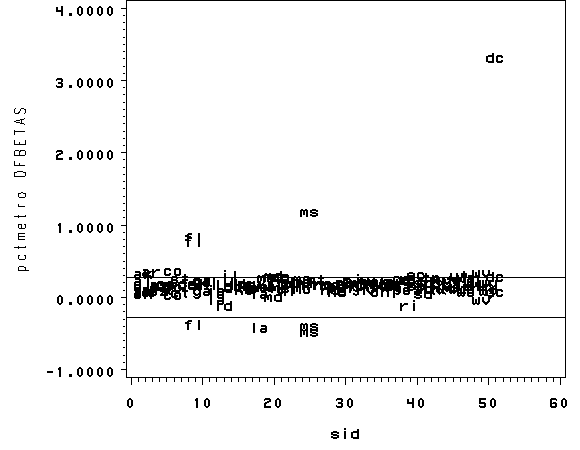
Now let’s list those observations with DFB_single larger than the cut-off value.
Again, we see that DC is the most problematic observation.
proc print data=crimedfbetas2;
  where abs(DFB_single) > 2/sqrt(51);
  var DFB_single state crime pctmetro poverty single;
run;
           DFB_
Obs      single    state    crime    pctmetro    poverty     single

 45     -0.5606     fl       1206      93.000    17.8000    10.6000
 49     -0.5680     ms        434      30.700    24.7000    14.7000
 51      3.1391     dc       2922     100.000    26.4000    22.1000
The following table summarizes the general rules of thumb we use for these
measures to identify observations worthy of further investigation (where k is the number
of predictors and n is the number of observations).
| Measure | Value |
| leverage | >(2k+2)/n |
| abs(rstu) | > 2 |
| Cook’s D | > 4/n |
| abs(DFITS) | > 2*sqrt(k/n) |
| abs(DFBETA) | > 2/sqrt(n) |
Washington D.C. has appeared as an outlier as well as an influential point in every analysis. Because
Washington D.C. is really not a state, we can use this to justify omitting it from the analysis,
saying that we really wish to just analyze states. First, let’s repeat our analysis
including DC.
proc reg data="c:sasregcrime";
  model crime=pctmetro poverty single;
run;
quit;
The REG Procedure
Model: MODEL1
Dependent Variable: crime violent crime rate

                             Analysis of Variance

                                    Sum of           Mean
Source                   DF        Squares         Square    F Value    Pr > F

Model                     3        8170480        2723493      82.16    <.0001
Error                    47        1557995          33149
Corrected Total          50        9728475


Root MSE            182.06817    R-Square     0.8399
Dependent Mean      612.84314    Adj R-Sq     0.8296
Coeff Var            29.70877


                             Parameter Estimates

                                     Parameter     Standard
Variable   Label               DF     Estimate        Error  t Value  Pr > |t|

Intercept  Intercept            1  -1666.43589    147.85195   -11.27    <.0001
pctmetro   pct metropolitan     1      7.82893      1.25470     6.24    <.0001
poverty    pct poverty          1     17.68024      6.94093     2.55    0.0142
single     pct single parent    1    132.40805     15.50322     8.54    <.0001
Now, let’s run the analysis omitting DC by including a where
statement (here ne stands for "not equal to" but you
could also use ~= to mean the same thing). As we expect, deleting DC made a large
change in the coefficient for single. The coefficient for single dropped
from 132.4 to 89.4. After having deleted DC, we would repeat the process we have
illustrated in this section to search for any other outlying and influential observations.
proc reg data="c:sasregcrime";
  model crime=pctmetro poverty single;
  where state ne "dc";
run;
quit;
The REG Procedure
Model: MODEL1
Dependent Variable: crime violent crime rate

                             Analysis of Variance

                                    Sum of           Mean
Source                   DF        Squares         Square    F Value    Pr > F

Model                     3        3098767        1032922      39.90    <.0001
Error                    46        1190858          25888
Corrected Total          49        4289625


Root MSE            160.89817    R-Square     0.7224
Dependent Mean      566.66000    Adj R-Sq     0.7043
Coeff Var            28.39413

                             Parameter Estimates

                                     Parameter     Standard
Variable   Label               DF     Estimate        Error  t Value  Pr > |t|

Intercept  Intercept            1  -1197.53807    180.48740    -6.64    <.0001
pctmetro   pct metropolitan     1      7.71233      1.10924     6.95    <.0001
poverty    pct poverty          1     18.28265      6.13596     2.98    0.0046
single     pct single parent    1     89.40078     17.83621     5.01    <.0001
Summary
In this section, we explored a number of methods of identifying outliers
and influential points. In a typical analysis, you would probably use only some of these
methods. Generally speaking, there are two types of methods for assessing
outliers: statistics such as residuals, leverage, Cook’s D and DFITS, that
assess the overall impact of an observation on the regression results, and
statistics such as DFBETA that assess the specific impact of an observation on
the regression coefficients.
In our example, we found that DC was a point of major concern. We
performed a regression with it and without it and the regression equations were very
different. We can justify removing it from our analysis by reasoning that our model
is to predict crime rate for states, not for metropolitan areas.
2.2 Tests for Normality of Residuals
One of the assumptions of linear regression analysis is that the residuals are normally
distributed. This assumption assures that the p-values for the t-tests will be valid.
As before, we will generate the residuals (called r) and predicted values
(called fv) and put them in a dataset (called elem1res). We
will also keep the variables api00, meals, ell and emer
in that dataset.
Let’s use the elemapi2 data file we saw in Chapter 1 for these analyses.
Let’s predict academic performance (api00) from percent receiving free meals (meals),
percent of English language learners (ell), and percent of teachers with emergency
credentials (emer).
proc reg data="c:sasregelemapi2";
 model api00=meals ell emer;
 output out=elem1res (keep= api00 meals ell emer r fv) residual=r predicted=fv;
run;
quit;
                             Analysis of Variance

                                    Sum of           Mean
Source                   DF        Squares         Square    F Value    Pr > F

Model                     3        6749783        2249928     673.00    <.0001
Error                   396        1323889     3343.15467
Corrected Total         399        8073672


Root MSE             57.82002    R-Square     0.8360
Dependent Mean      647.62250    Adj R-Sq     0.8348
Coeff Var             8.92804


                              Parameter Estimates

                                               Parameter      Standard
Variable    Label                       DF      Estimate         Error   t Value

Intercept   Intercept                    1     886.70326       6.25976    141.65
meals       pct free meals               1      -3.15919       0.14974    -21.10
ell         english language learners    1      -0.90987       0.18464     -4.93
emer        pct emer credential          1      -1.57350       0.29311     -5.37

                 Parameter Estimates

Variable    Label                       DF   Pr > |t|

Intercept   Intercept                    1     <.0001
meals       pct free meals               1     <.0001
ell         english language learners    1     <.0001
emer        pct emer credential          1     <.0001
Below we use proc kde to produce a kernel density plot. kde stands
for kernel density estimate. It can be thought as a histogram with narrow bins
and a moving average.
proc kde data=elem1res out=den;
  var r;
run;

proc sort data=den;
  by r;
run;

goptions reset=all;
symbol1 c=blue i=join v=none height=1;
proc gplot data=den;
  plot density*r=1;
run;
quit;
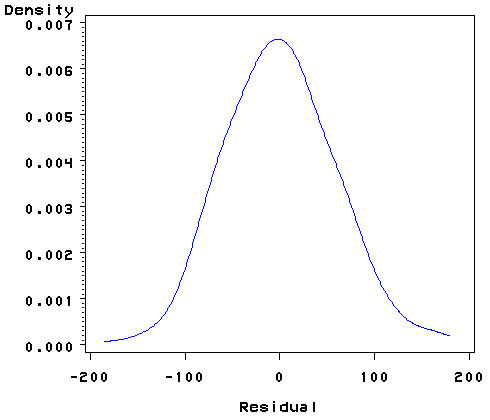
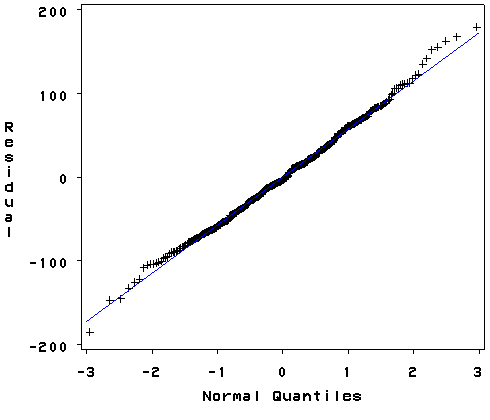
Proc univariate will produce a normal quantile graph. qqplot
plots the quantiles of a variable against the quantiles of a normal distribution.
qqplotis most sensitive to
non-normality near two tails. and probplot As you see below, the
qqplot command shows a slight deviation from
normal at the upper tail, as can be seen in the kde above.
We can accept that the residuals are close to a normal distribution.
goptions reset=all;
proc univariate data=elem1res normal;
 var r;
 qqplot r / normal(mu=est sigma=est);
run;
The UNIVARIATE Procedure
Variable:  r  (Residual)

                            Moments

N                         400    Sum Weights                400
Mean                        0    Sum Observations             0
Std Deviation       57.602241    Variance            3318.01817
Skewness           0.17092898    Kurtosis            0.13532745
Uncorrected SS     1323889.25    Corrected SS        1323889.25
Coeff Variation             .    Std Error Mean      2.88011205


              Basic Statistical Measures

    Location                    Variability

Mean      0.00000     Std Deviation           57.60224
Median   -3.65729     Variance                    3318
Mode       .          Range                  363.95555
                      Interquartile Range     76.47440


           Tests for Location: Mu0=0

Test           -Statistic-    -----p Value------

Student's t    t         0    Pr > |t|    1.0000
Sign           M       -10    Pr >= |M|   0.3421
Signed Rank    S      -631    Pr >= |S|   0.7855


                   Tests for Normality

Test                  --Statistic---    -----p Value------

Shapiro-Wilk          W     0.996406    Pr < W      0.5101
Kolmogorov-Smirnov    D     0.032676    Pr > D     >0.1500
Cramer-von Mises      W-Sq  0.049036    Pr > W-Sq  >0.2500
Anderson-Darling      A-Sq  0.340712    Pr > A-Sq  >0.2500


Quantiles (Definition 5)

Quantile        Estimate

100% Max       178.48224
99%            153.32833
95%             95.19177
90%             72.60901
75% Q3          36.50031
50% Median      -3.65729
25% Q1         -39.97409
10%            -72.36437
5%             -89.25117
1%            -129.60545
0% Min        -185.47331


           Extreme Observations

------Lowest-----        -----Highest-----

   Value      Obs           Value      Obs

-185.473      226         151.684      228
-146.908      346         154.972      327
-145.515      234         161.737      188
-133.233      227         167.168      271
-125.978      259         178.482       93
Severe outliers consist of those points that are either 3
inter-quartile-ranges below the first quartile or 3 inter-quartile-ranges above the third
quartile. The presence of any severe outliers should be sufficient evidence to reject
normality at a 5% significance level. Mild outliers are common in samples of any size. In
our case, we don’t have any severe outliers and the distribution seems fairly symmetric.
The residuals have an approximately normal distribution. (See the output of
the proc univariate above.)
In the Shapiro-Wilk W test
for normality, the p-value is based on the assumption that the distribution is
normal. In our example, the p-value is very large (0.51), indicating that we cannot reject that
r is normally distributed. (See the output of the proc univariate
above.)
2.3 Tests for Heteroscedasticity
One of the main assumptions for the ordinary least squares regression is the
homogeneity of variance of the residuals. If the model is well-fitted, there should be no
pattern to the residuals plotted against the fitted values. If the variance of the
residuals is non-constant, then the residual variance is said to be
"heteroscedastic." There are graphical and non-graphical methods for detecting
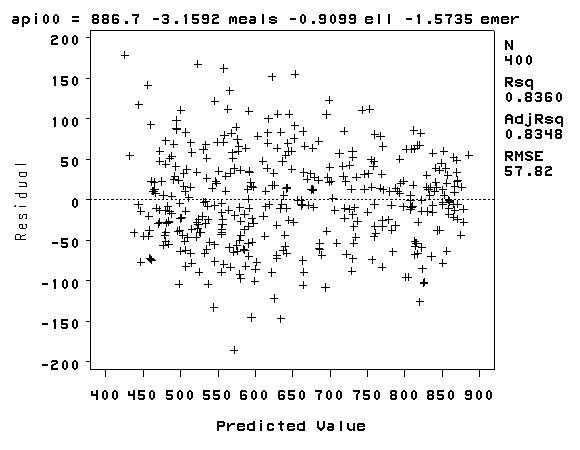
heteroscedasticity. A commonly used graphical method is to plot the residuals versus fitted (predicted) values. Below we
use a plot statement in the proc reg. The r. and p. tell
SAS to calculate the residuals (r.) and predicted values (p.) for
use in the plot. We see that the
pattern of the data points is getting a little narrower towards the right end, which is an
indication of mild heteroscedasticity.
proc reg data='c:sasregelemapi2';
 model api00 = meals ell emer;
 plot r.*p.;
run;
quit;
Now let’s look at a test for heteroscedasticity, the White test. The
White test tests the null hypothesis that the variance
of the residuals is homogenous. Therefore, if the p-value is very small, we would have to
reject the hypothesis and accept the alternative hypothesis that the variance is not
homogenous. We use the / spec option on the model statement to obtain the
White test.
proc reg data='c:sasregelemapi2';
 model api00 = meals ell emer / spec;
run;
quit;
<some output omitted to save space>

     Test of First and Second
       Moment Specification

    DF    Chi-Square    Pr > ChiSq

     9         22.16        0.0084
While the White test is significant, the distribution of the residuals in the
residual versus fitted plot did not seem overly heteroscedastic.
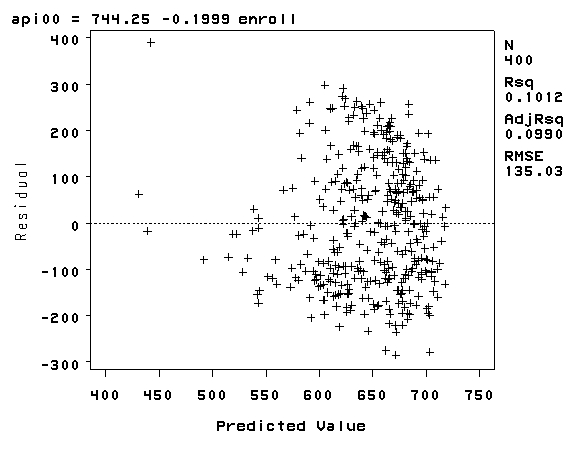
Consider another example where we use enroll as a predictor. Recall that we
found enroll to be skewed to the right in Chapter 1. As you can see, this example
shows much more serious heteroscedasticity.
proc reg data='c:sasregelemapi2';
 model api00 = enroll;
 plot r.*p.;
run;
quit;
The REG Procedure
Model: MODEL1
Dependent Variable: api00 api 2000

                             Analysis of Variance

                                    Sum of           Mean
Source                   DF        Squares         Square    F Value    Pr > F

Model                     1         817326         817326      44.83    <.0001
Error                   398        7256346          18232
Corrected Total         399        8073672


Root MSE            135.02601    R-Square     0.1012
Dependent Mean      647.62250    Adj R-Sq     0.0990
Coeff Var            20.84949

                             Parameter Estimates

                                     Parameter     Standard
Variable   Label               DF     Estimate        Error  t Value  Pr > |t|

Intercept  Intercept            1    744.25141     15.93308    46.71    <.0001
enroll     number of students   1     -0.19987      0.02985    -6.70    <.0001
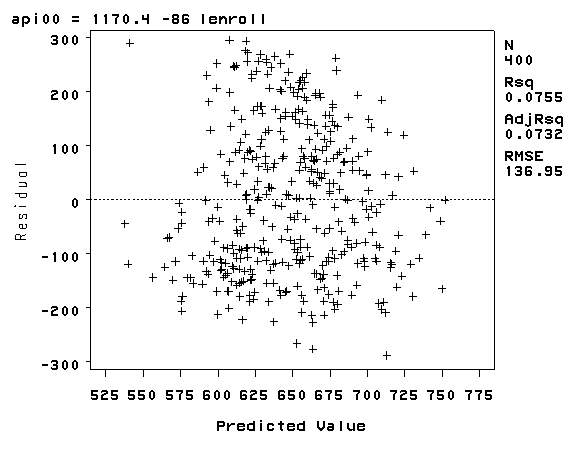
As we saw in Chapter 1, the variable enroll was skewed considerably to the right,
and we found that by taking a log transformation, the transformed variable was more
normally distributed. Below we transform enroll, run the regression and show the
residual versus fitted plot. The distribution of the residuals is much improved.
Certainly, this is not a perfect distribution of residuals, but it is much better than the
distribution with the untransformed variable.
data elemapi3;
 set 'c:sasregelemapi2';
 lenroll = log(enroll);
run;

proc reg data=elemapi3;
 model api00 = lenroll;
 plot r.*p.;
run;
quit;
The REG Procedure
Model: MODEL1
Dependent Variable: api00 api 2000

                             Analysis of Variance

                                    Sum of           Mean
Source                   DF        Squares         Square    F Value    Pr > F

Model                     1         609460         609460      32.50    <.0001
Error                   398        7464212          18754
Corrected Total         399        8073672


Root MSE            136.94634    R-Square     0.0755
Dependent Mean      647.62250    Adj R-Sq     0.0732
Coeff Var            21.14601

                            Parameter Estimates

                               Parameter      Standard
Variable    Label       DF      Estimate         Error   t Value   Pr > |t|

Intercept   Intercept    1    1170.42896      91.96567     12.73     <.0001
lenroll                  1     -85.99991      15.08605     -5.70     <.0001
Finally, let’s revisit the model we used at the start of this section, predicting api00
from meals, ell and emer. Using this model, the distribution of
the residuals looked very nice and even across the fitted values. What if we add enroll
to this model? Will this automatically ruin the distribution of the residuals?
Let’s add it and see.
proc reg data='c:sasregelemapi2';
 model api00 = meals ell emer enroll;
 plot r.*p.;
run;
quit;
The REG Procedure
Model: MODEL1
Dependent Variable: api00 api 2000

                             Analysis of Variance

                                    Sum of           Mean
Source                   DF        Squares         Square    F Value    Pr > F

Model                     4        6765344        1691336     510.63    <.0001
Error                   395        1308328     3312.22265
Corrected Total         399        8073672


Root MSE             57.55191    R-Square     0.8380
Dependent Mean      647.62250    Adj R-Sq     0.8363
Coeff Var             8.88665


                              Parameter Estimates

                                               Parameter      Standard
Variable    Label                       DF      Estimate         Error   t Value

Intercept   Intercept                    1     899.14659       8.47225    106.13
meals       pct free meals               1      -3.22166       0.15180    -21.22
ell         english language learners    1      -0.76770       0.19514     -3.93
emer        pct emer credential          1      -1.41824       0.30042     -4.72
enroll      number of students           1      -0.03126       0.01442     -2.17

                 Parameter Estimates

Variable    Label                       DF   Pr > |t|

Intercept   Intercept                    1     <.0001
meals       pct free meals               1     <.0001
ell         english language learners    1     <.0001
emer        pct emer credential          1     <.0001
enroll      number of students           1     0.0308
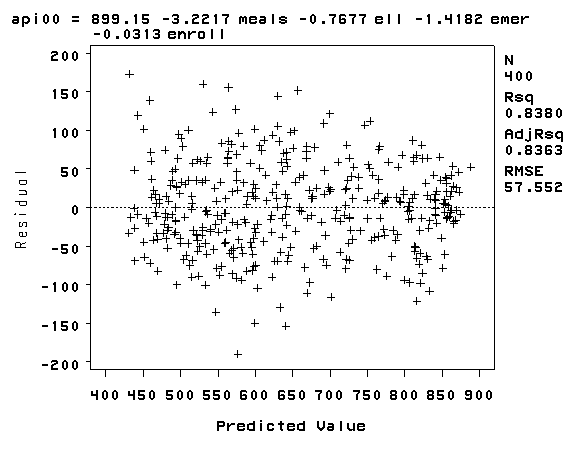
As you can see, the distribution of the residuals looks fine, even after we added the
variable enroll. When we had just the variable enroll in the model, we did a
log transformation to improve the distribution of the residuals, but when enroll was part
of a model with other variables, the residuals looked good enough so that no transformation was
needed. This illustrates how the distribution of the residuals, not the distribution
of the predictor, was the guiding factor in determining whether a transformation was
needed.
2.4 Tests for Collinearity
When there is a perfect linear relationship among the predictors, the estimates for a
regression model cannot be uniquely computed. The term collinearity describes two
variables are near perfect linear combinations of one another. When more than two
variables are involved, it is often called multicollinearity, although the two terms are
often used interchangeably.
The primary concern is that as the degree of multicollinearity increases, the
regression model estimates of the coefficients become unstable and the standard errors for
the coefficients can get wildly inflated. In this section, we will explore some SAS
options used with the model statement that help to detect multicollinearity.
We can use the vif option to check for multicollinearity. vif
stands for variance inflation factor. As a rule of thumb, a variable whose VIF
values is greater than 10 may merit further investigation. Tolerance, defined as 1/VIF, is
used by many researchers to check on the degree of collinearity. A tolerance value lower
than 0.1 is comparable to a VIF of 10. It means that the variable could be considered as a
linear combination of other independent variables. The tol option on the
model statement gives us these values. Let’s first look at the regression we
did from the last section, the regression model predicting api00 from meals, ell
and emer, and use the vif and tol options with the model
statement.
proc reg data='c:sasregelemapi2';
 model api00 = meals ell emer / vif tol;
run;
quit;
The REG Procedure
Model: MODEL1
Dependent Variable: api00 api 2000

                             Analysis of Variance

                                    Sum of           Mean
Source                   DF        Squares         Square    F Value    Pr > F

Model                     3        6749783        2249928     673.00    <.0001
Error                   396        1323889     3343.15467
Corrected Total         399        8073672


Root MSE             57.82002    R-Square     0.8360
Dependent Mean      647.62250    Adj R-Sq     0.8348
Coeff Var             8.92804


                             Parameter Estimates

                                            Parameter      Standard
Variable   Label                      DF     Estimate         Error   t Value

Intercept  Intercept                   1    886.70326       6.25976    141.65
meals      pct free meals              1     -3.15919       0.14974    -21.10
ell        english language learners   1     -0.90987       0.18464     -4.93
emer       pct emer credential         1     -1.57350       0.29311     -5.37

                            Parameter Estimates

                                                                    Variance
Variable   Label                      DF  Pr > |t|    Tolerance    Inflation

Intercept  Intercept                   1    <.0001            .            0
meals      pct free meals              1    <.0001      0.36696      2.72506
ell        english language learners   1    <.0001      0.39833      2.51051
emer       pct emer credential         1    <.0001      0.70681      1.4148
The VIFs look fine here. Here is an example where the VIFs are more worrisome.
proc reg data='c:sasregelemapi2';
 model api00 = acs_k3 avg_ed grad_sch col_grad some_col / vif tol;
run;
quit;
The REG Procedure
Model: MODEL1
Dependent Variable: api00 api 2000

                             Analysis of Variance

                                    Sum of           Mean
Source                   DF        Squares         Square    F Value    Pr > F

Model                     5        5056269        1011254     143.79    <.0001
Error                   373        2623191     7032.68421
Corrected Total         378        7679460


Root MSE             83.86110    R-Square     0.6584
Dependent Mean      647.63588    Adj R-Sq     0.6538
Coeff Var            12.94880


                              Parameter Estimates

                                      Parameter     Standard
Variable   Label                DF     Estimate        Error  t Value  Pr > |t|

Intercept  Intercept             1    -82.60913     81.84638    -1.01    0.3135
acs_k3     avg class size k-3    1     11.45725      3.27541     3.50    0.0005
avg_ed     avg parent ed         1    227.26382     37.21960     6.11    <.0001
grad_sch   parent grad school    1     -2.09090      1.35229    -1.55    0.1229
col_grad   parent college grad   1     -2.96783      1.01781    -2.92    0.0038
some_col   parent some college   1     -0.76045      0.81097    -0.94    0.3490

                     Parameter Estimates

                                                      Variance
Variable   Label                DF    Tolerance      Inflation

Intercept  Intercept             1            .              0
acs_k3     avg class size k-3    1      0.97187        1.02895
avg_ed     avg parent ed         1      0.02295       43.57033
grad_sch   parent grad school    1      0.06727       14.86459
col_grad   parent college grad   1      0.06766       14.77884
some_col   parent some college   1      0.24599        4.06515
In this example, the VIF and tolerance (1/VIF) values for avg_ed grad_sch
and col_grad are worrisome. All of these variables measure education of the
parents and the very high VIF values indicate that these variables are possibly
redundant. For example, after you know grad_sch and col_grad, you
probably can predict avg_ed very well. In this example, multicollinearity
arises because we have put in too many variables that measure the same thing: parent
education.
Let’s omit one of the parent education variables, avg_ed. Note that the
VIF values in the analysis below appear much better. Also, note how the standard
errors are reduced for the parent education variables, grad_sch and col_grad.
This is because the high degree of collinearity caused the standard errors to be inflated.
With the multicollinearity eliminated, the coefficient for grad_sch, which
had been non-significant, is now significant.
proc reg data='c:sasregelemapi2';
 model api00 =acs_k3 grad_sch col_grad some_col / vif tol;
run;
quit;
The REG Procedure
Model: MODEL1
Dependent Variable: api00 api 2000

                             Analysis of Variance

                                    Sum of           Mean
Source                   DF        Squares         Square    F Value    Pr > F

Model                     4        4180144        1045036     107.12    <.0001
Error                   393        3834063     9755.88497
Corrected Total         397        8014207


Root MSE             98.77188    R-Square     0.5216
Dependent Mean      648.46985    Adj R-Sq     0.5167
Coeff Var            15.23153


                              Parameter Estimates

                                      Parameter     Standard
Variable   Label                DF     Estimate        Error  t Value  Pr > |t|

Intercept  Intercept             1    283.74462     70.32475     4.03    <.0001
acs_k3     avg class size k-3    1     11.71260      3.66487     3.20    0.0015
grad_sch   parent grad school    1      5.63476      0.45820    12.30    <.0001
col_grad   parent college grad   1      2.47992      0.33955     7.30    <.0001
some_col   parent some college   1      2.15827      0.44388     4.86    <.0001

                     Parameter Estimates

                                                      Variance
Variable   Label                DF    Tolerance      Inflation

Intercept  Intercept             1            .              0
acs_k3     avg class size k-3    1      0.97667        1.02389
grad_sch   parent grad school    1      0.79213        1.26242
col_grad   parent college grad   1      0.78273        1.27759
some_col   parent some college   1      0.96670        1.03445
Let’s introduce another option regarding collinearity. The collinoint
option displays
several different measures of collinearity. For example, we can test for collinearity
among the variables we used in the two examples above. Note that if you
use the collin option, the intercept will be included in the calculation
of the collinearity statistics, which is not usually what you want. The collinoint
option excludes the intercept from those calculations, but it is still included
in the calculation of the regression.
proc reg data='c:sasregelemapi2';
 model api00 = acs_k3 avg_ed grad_sch col_grad some_col / vif tol collinoint;
run;
quit;
The REG Procedure
Model: MODEL1
Dependent Variable: api00 api 2000

                             Analysis of Variance

                                    Sum of           Mean
Source                   DF        Squares         Square    F Value    Pr > F

Model                     5        5056269        1011254     143.79    <.0001
Error                   373        2623191     7032.68421
Corrected Total         378        7679460

Root MSE             83.86110    R-Square     0.6584
Dependent Mean      647.63588    Adj R-Sq     0.6538
Coeff Var            12.94880

                              Parameter Estimates

                                      Parameter     Standard
Variable   Label                DF     Estimate        Error  t Value  Pr > |t|

Intercept  Intercept             1    -82.60913     81.84638    -1.01    0.3135
acs_k3     avg class size k-3    1     11.45725      3.27541     3.50    0.0005
avg_ed     avg parent ed         1    227.26382     37.21960     6.11    <.0001
grad_sch   parent grad school    1     -2.09090      1.35229    -1.55    0.1229
col_grad   parent college grad   1     -2.96783      1.01781    -2.92    0.0038
some_col   parent some college   1     -0.76045      0.81097    -0.94    0.3490

                     Parameter Estimates

                                                      Variance
Variable   Label                DF    Tolerance      Inflation

Intercept  Intercept             1            .              0
acs_k3     avg class size k-3    1      0.97187        1.02895
avg_ed     avg parent ed         1      0.02295       43.57033
grad_sch   parent grad school    1      0.06727       14.86459
col_grad   parent college grad   1      0.06766       14.77884
some_col   parent some college   1      0.24599        4.06515

  Collinearity Diagnostics(intercept
              adjusted)

                            Condition
  Number    Eigenvalue          Index

       1       2.41355        1.00000
       2       1.09168        1.48690
       3       0.92607        1.61438
       4       0.55522        2.08495
       5       0.01350       13.37294

                 Collinearity Diagnostics(intercept adjusted)

           ----------------------Proportion of Variation----------------------
  Number        acs_k3        avg_ed      grad_sch      col_grad      some_col

       1       0.00271       0.00389       0.00770       0.00783       0.00292
       2       0.43827   6.909873E-8    0.00072293       0.00283       0.10146
       3       0.47595    0.00012071       0.00517    0.00032642       0.12377
       4       0.08308    0.00001556       0.05501       0.05911       0.00583
       5   1.900448E-7       0.99597       0.93140       0.92990       0.76603
We now remove avg_ed and see the collinearity diagnostics improve considerably.
proc reg data='c:sasregelemapi2';
 model api00 = acs_k3 grad_sch col_grad some_col / vif tol collinoint;
run;
quit;
The REG Procedure
Model: MODEL1
Dependent Variable: api00 api 2000

                             Analysis of Variance

                                    Sum of           Mean
Source                   DF        Squares         Square    F Value    Pr > F

Model                     4        4180144        1045036     107.12    <.0001
Error                   393        3834063     9755.88497
Corrected Total         397        8014207


Root MSE             98.77188    R-Square     0.5216
Dependent Mean      648.46985    Adj R-Sq     0.5167
Coeff Var            15.23153


                              Parameter Estimates

                                      Parameter     Standard
Variable   Label                DF     Estimate        Error  t Value  Pr > |t|

Intercept  Intercept             1    283.74462     70.32475     4.03    <.0001
acs_k3     avg class size k-3    1     11.71260      3.66487     3.20    0.0015
grad_sch   parent grad school    1      5.63476      0.45820    12.30    <.0001
col_grad   parent college grad   1      2.47992      0.33955     7.30    <.0001
some_col   parent some college   1      2.15827      0.44388     4.86    <.0001

                     Parameter Estimates

                                                      Variance
Variable   Label                DF    Tolerance      Inflation

Intercept  Intercept             1            .              0
acs_k3     avg class size k-3    1      0.97667        1.02389
grad_sch   parent grad school    1      0.79213        1.26242
col_grad   parent college grad   1      0.78273        1.27759
some_col   parent some college   1      0.96670        1.03445


  Collinearity Diagnostics(intercept
               adjusted)

                             Condition
  Number     Eigenvalue          Index

       1        1.50947        1.00000
       2        1.04069        1.20435
       3        0.92028        1.28071
       4        0.52957        1.68830

            Collinearity Diagnostics(intercept adjusted)

            -----------------Proportion of Variation----------------
  Number         acs_k3       grad_sch       col_grad       some_col

       1        0.01697        0.22473        0.22822        0.06751
       2        0.62079        0.02055        0.05660        0.21947
       3        0.28967        0.08150        0.00153        0.66238
       4        0.07258        0.67322        0.71365        0.05064
The condition number is a commonly used index of the global instability of the
regression coefficients — a large condition number, 10 or more, is an indication of
instability.
2.5 Tests on Nonlinearity
When we do linear regression, we assume that the relationship between the response
variable and the predictors is linear. This is the assumption of linearity. If this
assumption is violated, the linear regression will try to fit a straight line to data that
does not follow a straight line. Checking the linear assumption in the case of simple
regression is straightforward, since we only have one predictor. All we have to do is a
scatter plot between the response variable and the predictor to see if nonlinearity is
present, such as a curved band or a big wave-shaped curve. For example, let us
use a data file called nations.sav that has data about a number of
nations around the world. Below we look at the proc contents for
this file to see the variables in the file (Note that the position option tells
SAS to list the variables in the order that they are in the data file.)
proc contents data='c:sasregnations' position;
run;
The CONTENTS Procedure

Data Set Name: c:sasregnations                       Observations:         109
Member Type:   DATA                                    Variables:            15
Engine:        V8                                      Indexes:              0
Created:       4:59 Saturday, January 9, 1960          Observation Length:   65
Last Modified: 4:59 Saturday, January 9, 1960          Deleted Observations: 0
Protection:                                            Compressed:           NO
Data Set Type:                                         Sorted:               NO
Label:
            -----Engine/Host Dependent Information-----

Data Set Page Size:         8192
Number of Data Set Pages:   2
First Data Page:            1
Max Obs per Page:           125
Obs in First Data Page:     80
Number of Data Set Repairs: 0
File Name:                  c:sasregnations.sas7bdat
Release Created:            7.0000M0
Host Created:               WIN_NT

         -----Alphabetic List of Variables and Attributes-----

 #    Variable    Type    Len    Pos    Label
-----------------------------------------------------------------------
 3    birth       Num       3      8    Crude birth rate/1000 people
 5    chldmort    Num       3     14    Child (1-4 yr) mortality 1985
 1    country     Char      8     57    Country
 4    death       Num       3     11    Crude death rate/1000 people
 9    energy      Num       4     28    Per cap energy consumed, kg oil
 8    food        Num       4     24    Per capita daily calories 1985
10    gnpcap      Num       4     32    Per capita GNP 1985
11    gnpgro      Num       8     36    Annual GNP growth % 65-85
 6    infmort     Num       4     17    Infant (<1 yr) mortality 1985
 7    life        Num       3     21    Life expectancy at birth 1985
 2    pop         Num       8      0    1985 population in millions
13    school1     Num       4     47    Primary enrollment % age-group
14    school2     Num       3     51    Secondary enroll % age-group
15    school3     Num       3     54    Higher ed. enroll % age-group
12    urban       Num       3     44    % population urban 1985

                -----Variables Ordered by Position-----

 #    Variable    Type    Len    Pos    Label
-----------------------------------------------------------------------
 1    country     Char      8     57    Country
 2    pop         Num       8      0    1985 population in millions
 3    birth       Num       3      8    Crude birth rate/1000 people
 4    death       Num       3     11    Crude death rate/1000 people
 5    chldmort    Num       3     14    Child (1-4 yr) mortality 1985
 6    infmort     Num       4     17    Infant (<1 yr) mortality 1985
 7    life        Num       3     21    Life expectancy at birth 1985
 8    food        Num       4     24    Per capita daily calories 1985
 9    energy      Num       4     28    Per cap energy consumed, kg oil
10    gnpcap      Num       4     32    Per capita GNP 1985
11    gnpgro      Num       8     36    Annual GNP growth % 65-85
12    urban       Num       3     44    % population urban 1985
13    school1     Num       4     47    Primary enrollment % age-group
14    school2     Num       3     51    Secondary enroll % age-group
15    school3     Num       3     54    Higher ed. enroll % age-group
Let’s look at the relationship between GNP per
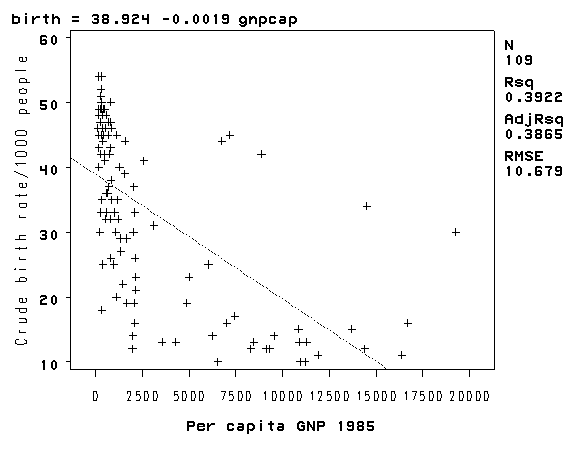
capita (gnpcap) and births (birth). Below if we look at
the scatterplot between gnpcap and birth, we can see that the
relationship between these two variables is quite non-linear. We added a
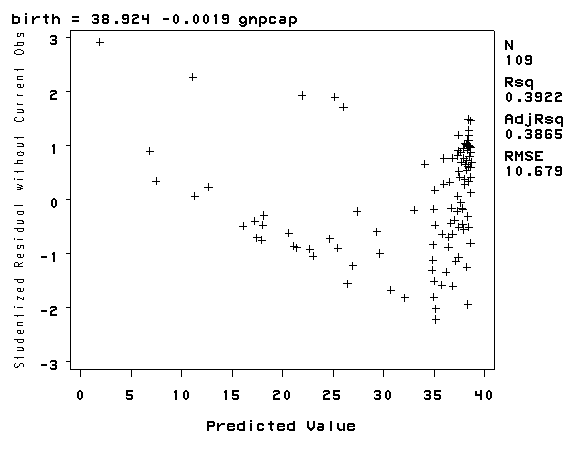
regression line to the chart, and you can see how poorly the line fits this data. Also, if we look at the
residuals by predicted plot, we see that the residuals are not nearly
homoscedastic,
due to the non-linearity in the relationship between gnpcap and birth.proc reg data='c:sasregnations'; model birth = gnpcap; plot rstudent.*p. / noline; plot birth*gnpcap; run; quit;
The REG Procedure
Model: MODEL1
Dependent Variable: birth Crude birth rate/1000 people

                             Analysis of Variance

                                    Sum of           Mean
Source                   DF        Squares         Square    F Value    Pr > F

Model                     1     7873.99472     7873.99472      69.05    <.0001
Error                   107          12202      114.03880
Corrected Total         108          20076


Root MSE             10.67890    R-Square     0.3922
Dependent Mean       32.78899    Adj R-Sq     0.3865
Coeff Var            32.56854

                             Parameter Estimates

                                               Parameter     Standard
Variable   Label                         DF     Estimate        Error  t Value

Intercept  Intercept                      1     38.92418      1.26150    30.86
gnpcap     Per capita GNP 1985            1     -0.00192   0.00023124    -8.31

                 Parameter Estimates

Variable   Label                         DF  Pr > |t|

Intercept  Intercept                      1    <.0001
gnpcap     Per capita GNP 1985            1    <.0001
Now we are going to modify the above scatterplot by adding a lowess (also
called "loess") smoothing line. By default, SAS will make four
graphs, one for smoothing of 0.1, 0.2, 0.3 and 0.4. We show only the graph
with the 0.4 smooth.
proc loess data='c:sasregnations';
 model birth = gnpcap / smooth=0.1 0.2 0.3 0.4;
 ods output OutputStatistics=Results;
run;

proc sort data=results;
 by SmoothingParameter gnpcap;
run;

goptions reset=all;
symbol1 v=dot i=none c=black;
symbol2 v=none i=join c=blue;
symbol3 v=none i=r c=red;
proc gplot data=results;
 by SmoothingParameter;
 plot DepVar*gnpcap=1 pred*gnpcap=2 DepVar*gnpcap=3 / overlay;
run;
quit;
The LOESS Procedure

      Independent Variable Scaling

          Scaling applied: None

                               Per capita
Statistic                        GNP 1985

Minimum Value                   110.00000
Maximum Value                       19270
< some output omitted >
The LOESS Procedure
Smoothing Parameter: 0.4
Dependent Variable: api00

                 Fit Summary

Fit Method                      Interpolation
Number of Observations                    400
Number of Fitting Points                   17
kd Tree Bucket Size                        32
Degree of Local Polynomials                 1
Smoothing Parameter                   0.40000
Points in Local Neighborhood              160
Residual Sum of Squares               6986406
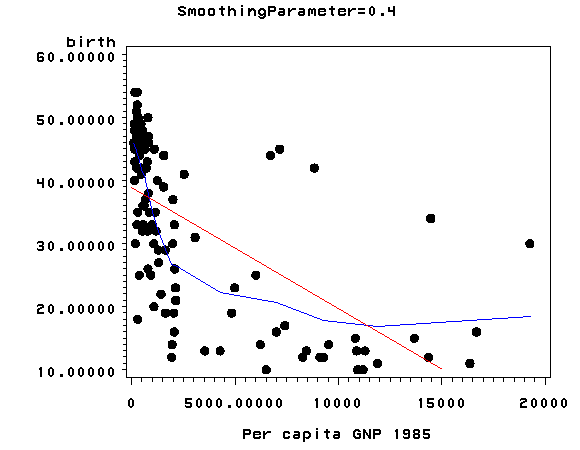
The lowess line
fits much better than the OLS linear regression. In trying to see how to remedy
these, we notice that the gnpcap scores are quite skewed with most values
being near 0, and a handful of values of 10,000 and higher. This suggests to us that some transformation of the variable
may be useful. One of the commonly used transformations is a log transformation. Let’s try
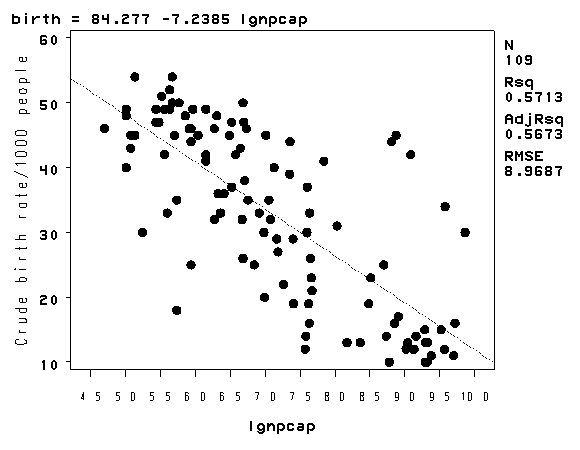
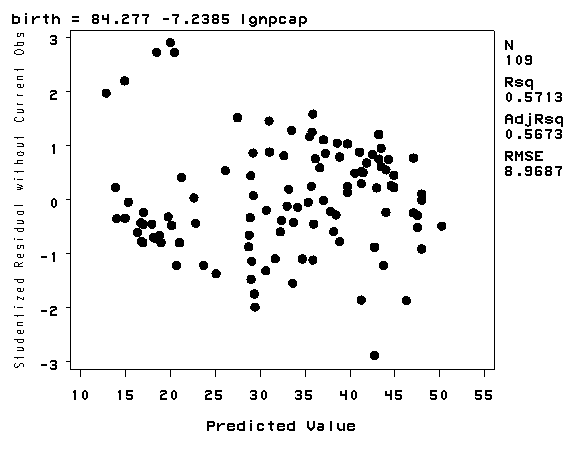
it below. As you see, the scatterplot between lgnpcap and birth
looks much better with the regression line going through the heart of the
data. Also, the plot of the residuals by predicted values look much more
reasonable.
data nations1;
 set 'c:sasregnations';
 lgnpcap = log(gnpcap);
run;

proc reg data=nations1;
 model birth = lgnpcap;
 plot rstudent.*p. / noline;
 plot birth*lgnpcap;
run;
quit;
The REG Procedure
Model: MODEL1
Dependent Variable: birth Crude birth rate/1000 people

                             Analysis of Variance

                                    Sum of           Mean
Source                   DF        Squares         Square    F Value    Pr > F

Model                     1          11469          11469     142.58    <.0001
Error                   107     8606.89865       80.43831
Corrected Total         108          20076


Root MSE              8.96874    R-Square     0.5713
Dependent Mean       32.78899    Adj R-Sq     0.5673
Coeff Var            27.35290


                             Parameter Estimates

                                               Parameter     Standard
Variable   Label                         DF     Estimate        Error  t Value

Intercept  Intercept                      1     84.27726      4.39668    19.17
lgnpcap                                   1     -7.23847      0.60619   -11.94

                 Parameter Estimates

Variable   Label                         DF  Pr > |t|

Intercept  Intercept                      1    <.0001
lgnpcap                                   1    <.000
This section has shown how you can use scatterplots to diagnose problems of
non-linearity, both by looking at the scatterplots of the predictor and outcome
variable, as well as by examining the residuals by predicted values. These
examples have focused on simple regression; however, similar techniques would be
useful in multiple regression. However, when using multiple regression, it
would be more useful to examine partial regression plots instead of the simple
scatterplots between the predictor variables and the outcome variable.
2.6 Model Specification
A model specification error can occur when one or more relevant variables are omitted
from the model or one or more irrelevant variables are included in the model. If relevant
variables are omitted from the model, the common variance they share with included
variables may be wrongly attributed to those variables, and the error term is inflated. On
the other hand, if irrelevant variables are included in the model, the common variance
they share with included variables may be wrongly attributed to them. Model specification
errors can substantially affect the estimate of regression coefficients.
Consider the model below. This regression suggests that as class size increases the
academic performance increases. Before we publish results saying that increased class size
is associated with higher academic performance, let’s check the model specification.
proc reg data='c:sasregelemapi2';
 model api00 = acs_k3;
 output out=res1 (keep= api00 acs_k3 fv) predicted=fv;
run;
quit;
The REG Procedure
Model: MODEL1
Dependent Variable: api00 api 2000

                             Analysis of Variance

                                    Sum of           Mean
Source                   DF        Squares         Square    F Value    Pr > F

Model                     1         234354         234354      11.93    0.0006
Error                   396        7779853          19646
Corrected Total         397        8014207


Root MSE            140.16453    R-Square     0.0292
Dependent Mean      648.46985    Adj R-Sq     0.0268
Coeff Var            21.61466


                             Parameter Estimates

                                     Parameter     Standard
Variable   Label               DF     Estimate        Error  t Value  Pr > |t|

Intercept  Intercept            1    308.33716     98.73085     3.12    0.0019
acs_k3     avg class size k-3   1     17.75148      5.13969     3.45    0.0006
There are a couple of methods to detect specification errors. A link test performs a model specification test for
single-equation models. It is based on the idea that if a regression is
properly specified, one should not be able to find any additional independent variables
that are significant except by chance. To conduct this test, you need to obtain
the fitted values from your regression and the squares of those values. The model is then refit using these two variables as predictors.
The fitted value should be significant because it is the predicted value. One the other hand,
the fitted values squared shouldn’t be significant, because if our model is specified correctly, the squared predictions should not have much of
explanatory power. That is, we wouldn’t expect the fitted value
squared to be a
significant predictor if our model is specified correctly. So we will be looking at the p-value for
the fitted value squared.
data res1sq;
 set res1;
 fv2 = fv**2;
run;

proc reg data=res1sq;
 model api00 = fv fv2;
run;
quit;
< some output omitted to save space >

                              Parameter Estimates

                                              Parameter      Standard
Variable    Label                      DF      Estimate         Error   t Value

Intercept   Intercept                   1    3884.50651    2617.69642      1.48
fv          Predicted Value of api00    1     -11.05014       8.10464     -1.36
fv2                                     1       0.00933       0.00627      1.49

                Parameter Estimates

Variable    Label                      DF   Pr > |t|

Intercept   Intercept                   1     0.1386
fv          Predicted Value of api00    1     0.1735
fv2                                     1     0.1376
Let’s try adding one more variable, meals, to the above model and then
run the link test again.
proc reg data='c:sasregelemapi2';
 model api00 = acs_k3 full meals;
 output out=res2 (keep= api00 acs_k3 full fv) predicted=fv;
run;
quit;
< output omitted to save space >

data res2sq;
 set res2;
 fv2 = fv**2;
run;

proc reg data=res2sq;
 model api00 = fv fv2;
run;
quit;
< some output omitted to save space >

                              Parameter Estimates

                                              Parameter      Standard
Variable    Label                      DF      Estimate         Error   t Value

Intercept   Intercept                   1    -136.51045      95.05904     -1.44
fv          Predicted Value of api00    1       1.42433       0.29254      4.87
fv2                                     1   -0.00031721    0.00021800     -1.46

                Parameter Estimates

Variable    Label                      DF   Pr > |t|

Intercept   Intercept                   1     0.1518
fv          Predicted Value of api00    1     <.0001
fv2                                     1     0.1464
The link test is once again non-significant. Note that after including meals and full, the
coefficient for class size is no longer significant. While acs_k3 does have a
positive relationship with api00 when no other variables are in the model, when we
include, and hence control for, other important variables, acs_k3 is no
longer significantly related to api00 and its relationship to api00
is no longer positive.
2.7 Issues of Independence
The statement of this assumption is that the errors associated with one observation are not
correlated with the errors of any other observation cover several different situations.
Consider the case of collecting data from students in eight different elementary schools. It is
likely that the students within each school will tend to be more like one another that students
from different schools, that is, their errors are not independent. We will deal with this type
of situation in Chapter 4.
Another way in which the assumption of independence can be broken is when data are collected on the
same variables over time. Let’s say that we collect truancy data every semester for 12 years. In
this situation it is likely that the errors for observation between adjacent semesters will be
more highly correlated than for observations more separated in time. This is known as
autocorrelation. When you have data that can be considered to be time-series, you should use
the dw option that performs a Durbin-Watson test for correlated residuals.
We don’t have any time-series data, so we will use the elemapi2 dataset and
pretend that snum indicates the time at which the data were collected. We
will sort the data on snum to order the data according to our fake time
variable and then we can run the regression analysis with the dw
option to request the Durbin-Watson test.
The Durbin-Watson statistic has a range from 0 to 4 with a midpoint of 2. The observed value in
our example is less than 2, which is not surprising since our data are not truly
time-series.
proc reg data='c:sasregelemapi2';
 model api00 = enroll / dw;
 output out=res3 (keep = snum r) residual=r;
run;
quit;
The REG Procedure
Model: MODEL1
Dependent Variable: api00 api 2000

                             Analysis of Variance

                                    Sum of           Mean
Source                   DF        Squares         Square    F Value    Pr > F

Model                     1         817326         817326      44.83    <.0001
Error                   398        7256346          18232
Corrected Total         399        8073672


Root MSE            135.02601    R-Square     0.1012
Dependent Mean      647.62250    Adj R-Sq     0.0990
Coeff Var            20.84949


                             Parameter Estimates

                                     Parameter     Standard
Variable   Label               DF     Estimate        Error  t Value  Pr > |t|

Intercept  Intercept            1    744.25141     15.93308    46.71    <.0001
enroll     number of students   1     -0.19987      0.02985    -6.70    <.0001
Durbin-Watson D                1.342
Number of Observations           400
1st Order Autocorrelation      0.327
goptions reset=all;
proc gplot data=res3;
 plot r*snum;
run;
quit;
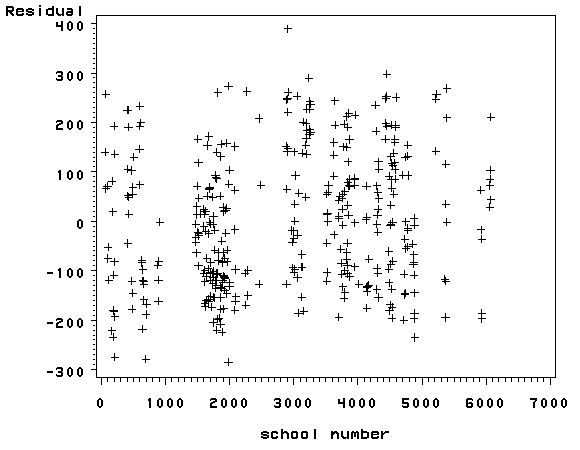
2.8 Summary
In this chapter, we have used a number of tools in SAS for determining whether our
data meets the regression assumptions. Below, we list the major commands we demonstrated
organized according to the assumption the command was shown to test.
- Detecting Unusual and Influential Data
- scatterplots of the dependent variables versus the independent variable
- looking at the largest values of the studentized residuals, leverage,
Cook’s D, DFFITS and DFBETAs
- Tests for Normality of Residuals Tests for Heteroscedasity
- kernel density plot
- quantile-quantile plots
- standardized normal probability plots
- Shapiro-Wilk W test
- scatterplot of residuals versus predicted (fitted) values
- White test
- Tests for Multicollinearity
- looking at VIF
- looking at tolerance
- Tests for Non-Linearity
- scatterplot of independent variable versus dependent variable
- Tests for Model Specification
- time series
- Durbin-Watson test
2.9 For more information
- Web Links