Purpose: The purpose of this program is to facilitate the
comparison between a standard normal distribution and the sampling distribution
of the mean for the sample size specified by the user.Download: You can download this program from within Stata by
typing search sdmdemo (see
How can I use the search command to search for programs and get additional
help? for more information about using search).
Use of program: To use this program, type sdmdemo in the Stata command window.
A dialogue window will open that allows the user to add or subtract one from the
sample size (N) by clicking on the appropriate button. The sdmdemo
command also opens a Stata graph window showing a graph of a normal distribution
in yellow and the sampling distribution in red. In this graph, the
sampling distribution is overlaid on the normal distribution because by default
N = 1. The user can increase or decrease the sample size by clicking on
the "N + 1" or "N – 1" buttons. Clicking on the "show movie" button in the dialogue
window will show a "movie" in which the mean of the sampling
distribution is increased from one to 25. A pull-down menu allows the
user to control the speed of the frames of the movie. This can be done by clicking
on the down-arrow to the right of "delay = ". The higher the
number, the slower the movie. To exit the program, click on the
"done" button.Examples: The following shows the output from issuing the sdmdemo
command.

The following example shows the results of increasing the sample size to
three. Notice that increasing the sample size results in a steeper curve.

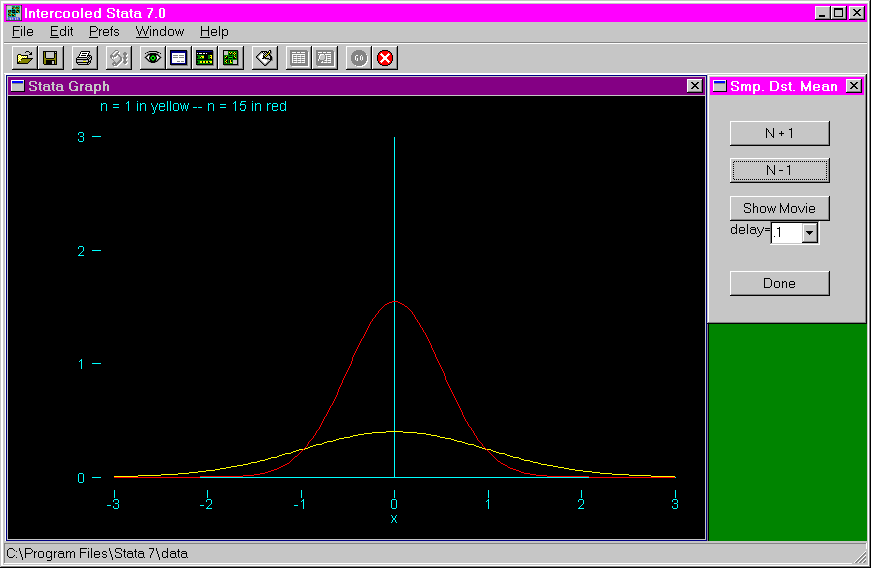
The following example shows the results of increasing the sample size to
fifteen. Notice how the distribution is becoming "tighter"
around the mean.