
Note that unless otherwise noted, we used IGLS estimation.
In this chapter we will be using the following centered variables: GndC_verb is iq_verb centered around the grand mean; GrpM_verb contains the group means of iq_verb; GrpMC_verb contains the group means of GndC_verb. Furthermore, we will be creating the following centered variables: GrpC_size which is the group centered variable for groupsiz; GndC_ses is ses centered around the grand mean; verbXgsize which is the interaction of GndC_verb and GndC_gsize.
From chapter 4: creating the variables constant, GndC_verb and GrpMC_verb.
Creating the constant variable.
Data Manipulation
 Names
  This opens up a window listing all the variables in the dataset with the
  number of non-missing observations, missing observation, max and min for
  each variable.  We just need to find out the total number of observations
  in the dataset but this is a nice window to have open to keep an eye on
  which variables have been corrected and do they look reasonable.
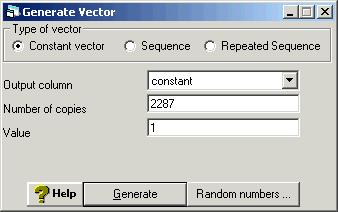
   Generate Vector
    For the output column choose an unused variable and rename it cons by
    using ctrl+n which brings up a rename window.  Then enter the total
    number of observations in the data set for number of copies, in this
    case n=2287.  Finally, enter 1 for the value since this will be a constant
    variable equal to 1.
     Click generate in order to execute the command
Calculating the grand mean for iq_verb and then creating the variable gndc_verb which is centered around the grand mean.
Basic Statistics
 Averages and Correlations
  Choose iq_verb and click on calculate.
Calculate
 Choose an unused variable and rename it gndc_verb by using ctrl+n
 Enter "gndc_verb" = "iq_verb" - 11.834 and click on calculate.
Creating the variable grpmc_verb which contains the group means of gndc_verb.
Data Manipulation
 Multilevel Data Manipulation
  in the input column choose gndc_verb, in the output column choose an unused variable and use ctrl+N
  to rename it grpmc_verb then this will be the output variable
   Click Add to action list which will make the input and output choices appear in the action list
   on the right hand side
    Click on Execute
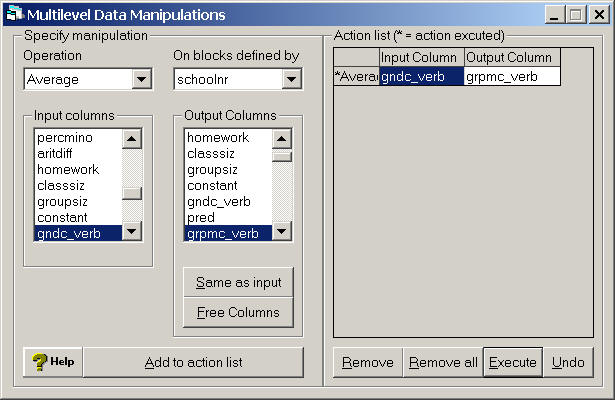
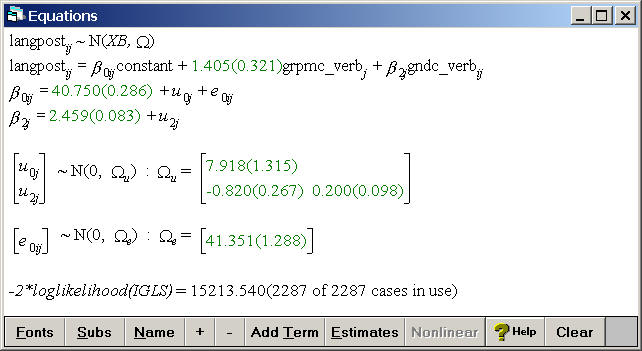
Table 5.1, p. 71.
Random slope model including grpmc_verb as a fixed effect and gndc_verb as a both a random slope and as a fixed effect.
Model
 Equations
  Click on Y
  Choose y: langpost, N levels: 2 - ij, level2(j): schoolnr, and
  level1(i): pupilnr.
   Click on the x0 variable
   Choose the variable constant and select both schoolnr and pupilnr.
    Add Term
     Click on the x1 variable
     Choose grpmc_verb as a fixed parameter
      Add Term
       Click on the x2 variable
       Choose gndc_verb as a fixed parameter and as a random slope with variance
       at the j(schoolnr) level
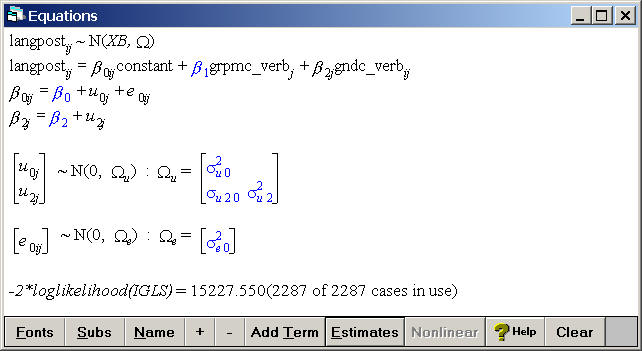
Click on the Start button located below the file menu and then click on estimates at the bottom of the equations window to make the estimates appear.
Generate the predicted values from the model in table 5.1 and storing them in the variable pred.
Model
 Predictions
  in the field called output from prediction to choose pred
   Click on Name to see the names of the variables in the model
    Click on constant, grpmc_verb and gndc_verb which will make all the
    parameters in the model appear in black
     Click on the level 1 error term to make it grey since we do not want to model this error term
      Click on Calc to generate the predicted values and store them in the variable pred
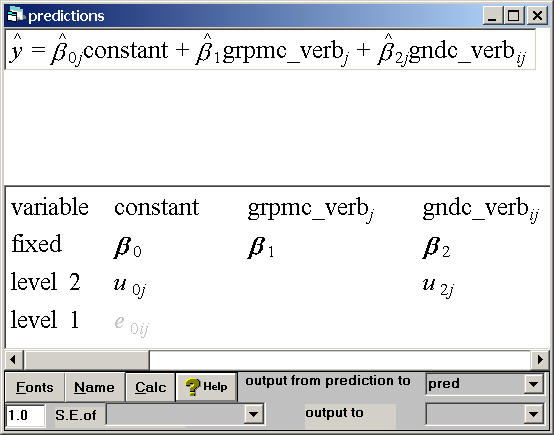
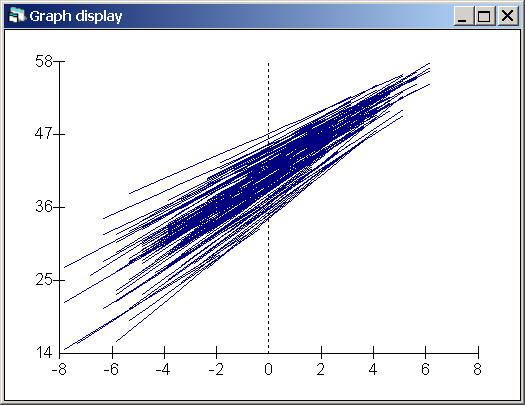
Fig. 5.2, p. 79.
This graph shows the regression lines for all the schools, not just for 15 randomly chosen schools, by plotting the predicted values pred by gndc_verb.
Graphs
 Customised Graph(s)
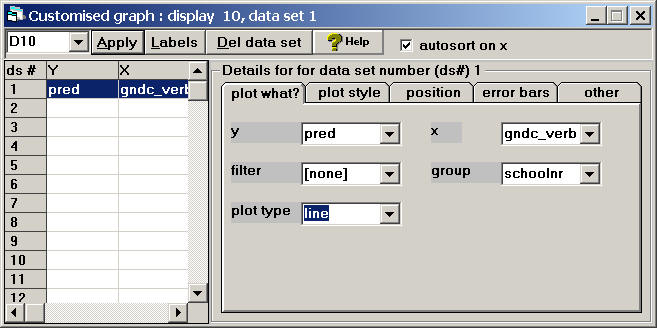
  in the field called y choose pred, for x choose gndc_verb, for group choose schoolnr, and
  for plot type choose line
   Click Apply to generate the graph
Creating the variable gndc_gsize which is groupsiz centered around the grand mean and verbXgsize which is the interaction of gndc_gsize and gndc_verb.
Calculate
Choose an unused variable and rename it gndc_gsize by using ctrl+n
 Enter "gndc_gsize" = "groupsiz" - 23.1 and click on calculate
  Clear the equation window
   Choose an unused variable and rename it verbXgsize by using ctrl+n
    Enter "verbXgsize" = "gndc_verb"*"gndc_gsize" and click on calculate
Table 5.2, p. 75.
Model with random slopes and cross-level interactions.
Model
 Equations
  Click on Y
  Choose y: langpost, N levels: 2 - ij, level2(j): schoolnr, and
  level1(i): pupilnr.
   Click on the x0 variable
   Choose the variable constant and select both schoolnr and pupilnr.
    Add Term
     Click on the x1 variable
     Choose grpmc_verb as a fixed parameter
      Add Term
       Click on the x2 variable
       Choose gndc_verb as a fixed parameter and as a random slope with variance
       at the j(schoolnr) level
        Add Term
         Click on the x3 variable
         Choose gndc_gsize as a fixed parameter
          Add Term
           Click on the x4 variable
           Choose verbXgsize as a fixed parameter
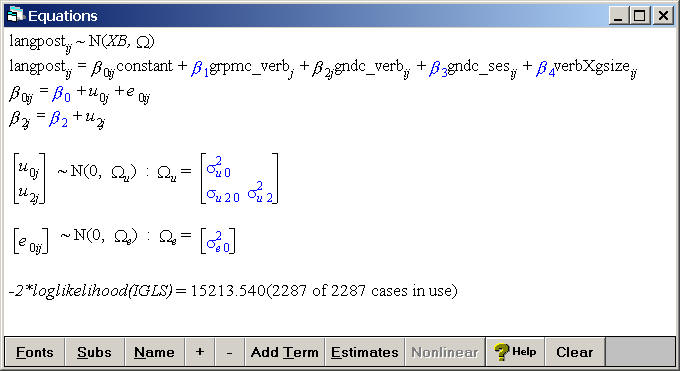
Click on the Start button located below the file menu and then click on estimates at the bottom of the equations window to make the estimates appear.
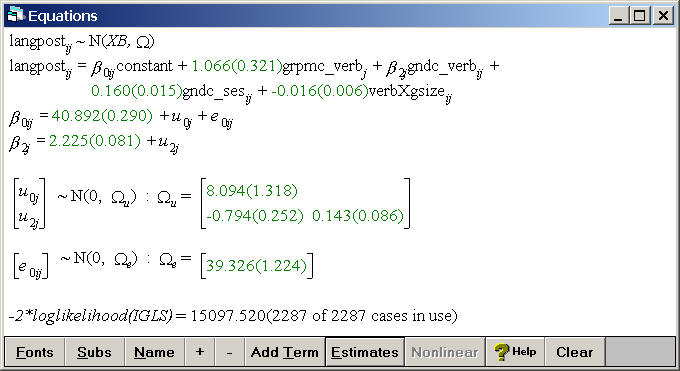
Page 77, table 5.3 (skipped for now)
Calculating the grand mean for ses and then creating the variable gndc_ses which is centered around the grand mean.
Basic Statistics
 Averages and Correlations
  Choose ses and click on calculate.
Calculate
Choose an unused variable and rename it gndc_ses by using ctrl+n
 Enter "gndc_ses" = "ses" - 27.812 and click on calculate.
Creating the variable verbXcomb which is the interaction of gndc_verb and comb.
Calculate
Choose an unused variable and rename it verbXcomb by using ctrl+n
 Enter "verbXcomb" = "gndc_verb"*"comb" and click on calculate.
Table 5.4, p. 78
The smaller and more parsimonious model including a random slope and many fixed effects.
Model
 Equations
  Click on Y
  Choose y: langpost, N levels: 2 - ij, level2(j): schoolnr, and
  level1(i): pupilnr.
   Click on the x0 variable
   Choose the variable constant and select both schoolnr and pupilnr.
    Add Term
     Click on the x1 variable
     Choose grpmc_verb as a fixed parameter
      Add Term
       Click on the x2 variable
       Choose gndc_verb as a fixed parameter and as a random slope with variance
         at the j(schoolnr) level
        Add Term
         Click on the x3 variable
         Choose gndc_ses as a fixed parameter
          Add Term
           Click on the x4 variable
           Choose comb as a fixed parameter
            Add Term
             Click on the x5 variable
             Choose verbXcomb as a fixed parameter
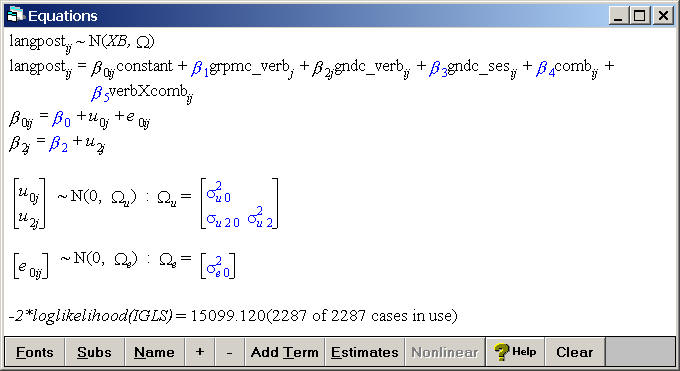
Click on the Start button located below the file menu and then click on estimates at the bottom of the equations window to make the estimates appear.
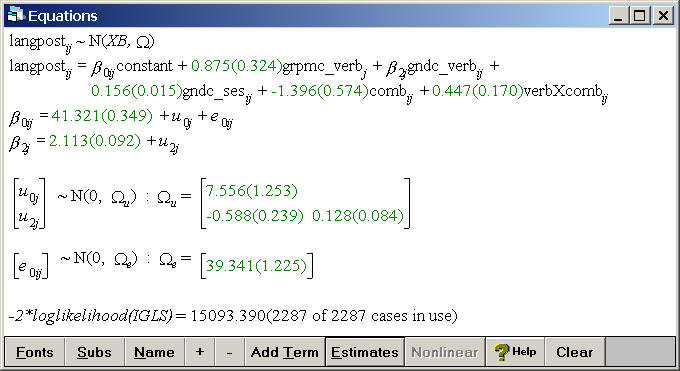
Page 84, table 5.5 (we don’t have the data for this example)