
Given a dataset in SAS, you may wish to write out your data to a fixed format
file. If you use the column placement method found in the first example in
SAS FAQ: How do I write out a fixed-format file?,
your variables will be left-justified. If you wish for your variables to
be right-justified (perhaps to meet the read-in specifications of another
software program), you can do so by using the -R option in the put
statement, which will
write out your variables to be right justified.
data hsb2;
  input  id female race ses prog
         sub1 sub2 sub3 sub4 sub5;
datalines;
 70 0 4 1 1 57 52 41 47 57
121 1 4 2 3 68 59 53 63 61
 86 0 4 3 1 44 33 54 58 31
141 0 4 3 3 63 44 47 53 56
172 0 4 2 2 47 52 57 53 61
113 1 4 2 2 44 52 51 63 61
 50 0 3 2 1 50 59 42 53 61
 11 0 1 2 2 34 46 45 39 36
 84 0 4 2 1 63 57 54 51 63
 48 1 3 2 2 57 55 52 50 51
 75 1 4 2 3 60 46 51 53 61
 60 1 4 2 2 57 65 51 63 61
 95 0 4 3 2 73 60 71 61 71
104 0 4 3 2 54 63 57 55 46
 38 0 3 1 2 45 57 50 31 56
115 0 4 1 1 42 49 43 50 56
 76 0 4 3 2 47 52 51 50 56
195 0 4 2 1 57 57 60 56 52
;
run;

filename out "C:hsb_ff.txt";

data _null_; set hsb2;
  file out;
  put (id female race ses prog sub1 sub2 sub3 sub4 sub5) (4. -R);
run;
We can see the values as they appear in our output file:
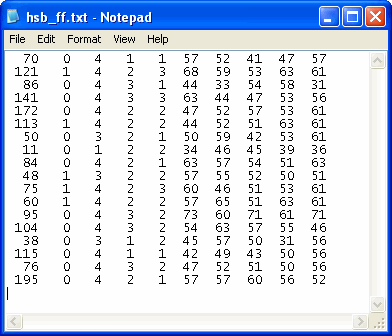
Using the -R, -C, and -L options in the put statement
allow you to justify your variables differently within the same file, if
desired. For example, if we wished for our first two variables to be
left-justified and the other variables to be right justified, we could use the
put statement below.
put (id female)(4. -L) (race ses prog sub1 sub2 sub3 sub4 sub5) (4. -R);