
SAS has many special symbols for plotting data points. These are specified on
the symbol statement. The chart below gives some of the specially symbols that can be used for plotting data points.
Note that you cannot specify a font on the symbol statement when using
these symbols. (If you specify a font, either a different symbol will be
used or an error message will be given in the log.)
![[IMAGE]](https://stats.idre.ucla.edu/wp-content/uploads/2016/02/symbol.gif)
An example using one of the symbols above is given below, using
♂ for the plot symbol. You can shorten value to v.
The color option (which is shortened to c) indicates the color of
the symbol. The height option (which is shortened to h)
determines the height of the symbol. The
hsb2.sas7bdat data set is used in the
proc gplot, and the where
statement indicates that only the data for the males should be plotted.
symbol v = > c = blue h = 3;
proc gplot data = hsb2;
  where female = 0;
  plot write*read;
run;
quit;
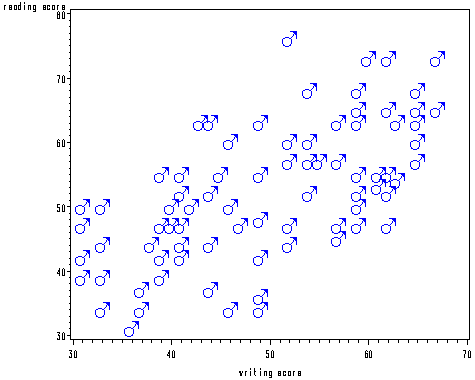
There are many other symbols available from SAS. To use these, you need
to specify a specific font.
SAS fonts that contain special symbols include:
- CARTOG
- SPECIAL
- ELECTRON
- MATH
- WEATHER
- MUSIC
- MARKER
We can use SAS proc gfont to see the symbols and the corresponding
character codes. The character codes are the letters on the keyboard that
are associated with a particular symbol. In the example below, a
left-pointing triangle is the symbol and the capital letter A is the character
code. The program below can be used to see what symbols that font called
Marker has.
goptions reset = all ctext = blue htext = 6pct ftext = swissb ;
title "Special symbols with the Marker font";
proc gfont name = marker ctext = red showroman nobuild;
run;

In the goptions statement, we use reset = all to "clear out"
any settings that may have been sued in graphs run previously in our current SAS
session. The ctext option defines the color of the text, the htext option defines the height of the text, and the
ftext option
defines the font in which the text (here, the title) will be displayed.
The ftext can different from the font listed on the proc gfont
statement. The showroman option on the proc gfont statement
tells SAS to print the character codes below each symbol. The nobuild
option tells SAS that you are not trying to create your own font/symbol
and not to look for an input data set.