
Version info: Code for this page was tested in SPSS 20.
Logistic regression, also called a logit model, is used to model dichotomous
outcome variables. In the logit model the log odds of the outcome is modeled as a linear
combination of the predictor variables.
Please note: The purpose of this page is to show how to use various data analysis commands.
It does not cover all aspects of the research process which researchers are expected to do. In
particular, it does not cover data cleaning and checking, verification of assumptions, model
diagnostics and potential follow-up analyses.
Examples
Example 1: Suppose that we are interested in the factors
that influence whether a political candidate wins an election. The
outcome (response) variable is binary (0/1); win or lose.
The predictor variables of interest are the amount of money spent on the campaign, the
amount of time spent campaigning negatively and whether or not the candidate is an
incumbent.
Example 2: A researcher is interested in how variables, such as GRE (Graduate Record Exam scores),
GPA (grade
point average) and prestige of the undergraduate institution, effect admission into graduate
school. The response variable, admit/don’t admit, is a binary variable.
Description of the data
For our data analysis below, we are going to expand on Example 2 about getting
into graduate school. We have generated hypothetical data, which can be
obtained from our website by clicking on binary.sav.
You can store this anywhere you like, but the syntax below assumes it has been
stored in the directory c:data.
This dataset has a binary response (outcome, dependent) variable called admit,
which is equal to 1 if the individual was admitted to graduate school, and 0
otherwise. There are three
predictor variables: gre, gpa, and rank. We will treat the variables
gre and gpa as continuous.
The variable rank takes on the values 1 through 4. Institutions with a rank of 1 have the highest
prestige, while those with a rank of 4 have the lowest. We start out by opening
the dataset and looking at some descriptive statistics.
get file = "c:\data\binary.sav". descriptives /variables=gre gpa.frequencies /variables = rank.
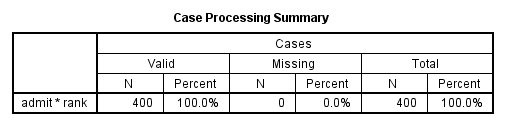
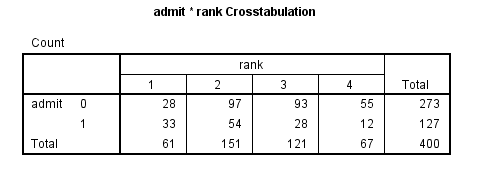
crosstabs /tables = admit by rank.
Analysis methods you might consider
Below is a list of some analysis methods you may have encountered.
Some of the methods listed are quite reasonable while others have either
fallen out of favor or have limitations.
- Logistic regression, the focus of this page.
- Probit regression. Probit analysis will produce results similarlogistic regression. The choice of probit versus logit depends largely on
individual preferences.
- OLS regression. When used with a binary response variable, this model is knownas a linear probability model and can be used as a way to
describe conditional probabilities. However, the errors (i.e., residuals)
from the linear probability model violate the homoskedasticity andnormality of errors assumptions of OLS
regression, resulting in invalid standard errors and hypothesis tests. For
a more thorough discussion of these and other problems with the linear
probability model, see Long (1997, p. 38-40).
- Two-group discriminant function analysis. A multivariate method for
dichotomous outcome variables. - Hotelling’s T2. The 0/1 outcome is turned into thegrouping variable, and the former predictors are turned into outcome
variables. This will produce an overall test of significance but will not
give individual coefficients for each variable, and it is unclear the extent
to which each “predictor” is adjusted for the impact of the other
“predictors.”
Logistic regression
Below we use the logistic regression command to run a model predicting the outcome variable
admit, using gre, gpa, and rank. The categorical option
specifies that rank is a categorical rather than continuous variable. The
output is shown in sections, each of which is discussed below.
logistic regression admit with gre gpa rank
   /categorical = rank.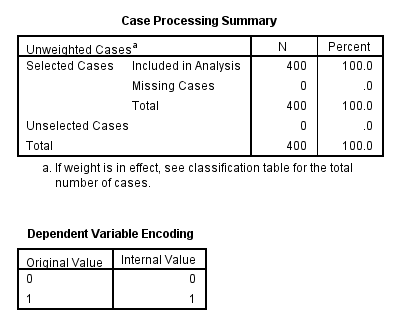
The first table above shows a breakdown of the number of cases used and not
used in the analysis. The second table above
gives the coding for the outcome variable, admit.
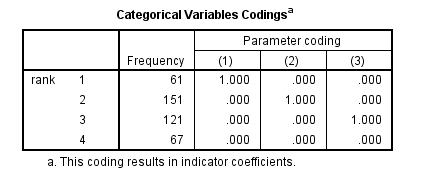
The table above shows how the values of the categorical variable
rank were handled, there are terms (essentially dummy variables) in the model for
rank=1,
rank=2, and rank=3; rank=4 is the omitted category.
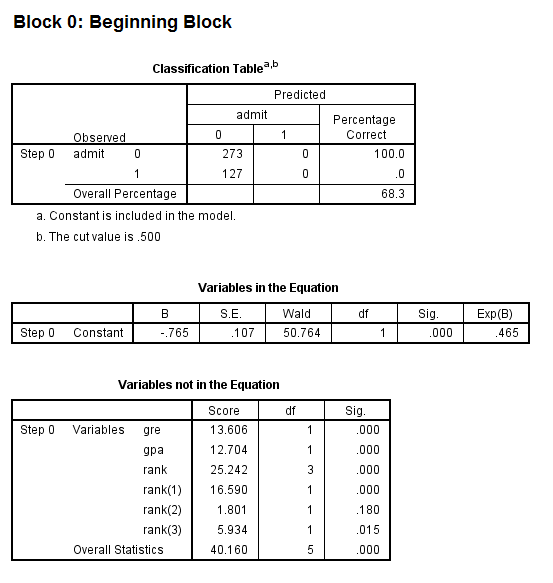
- The first model in the output is a null model, that is, a model with no predictors.
- The constant in the table labeled Variables in the Equation gives the
unconditional log odds of admission (i.e., admit=1). - The table labeled Variables not in the Equation gives the results of a score test, also known as a
Lagrange multiplier test. The column labeled Score gives the estimated change in
model fit if the term is added to the model,
the other two columns give the degrees of freedom, and p-value (labeled Sig.)
for the estimated change. Based on the table above, all three of the
predictors, gre, gpa,
and rank, are expected to improve the fit of the model.
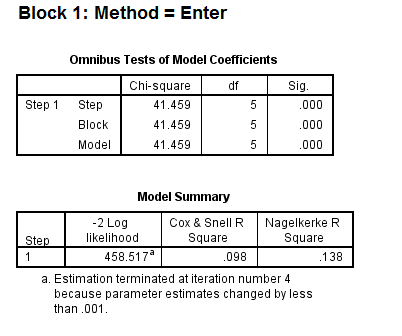
- The first table above gives the overall test for the model that includes
the predictors. The chi-square value of 41.46 with a p-value of less than 0.0005 tells us
that our model as a whole fits significantly better than an empty model (i.e.,
a model with no predictors). - The -2*log likelihood (458.517) in the Model Summary table can be used in comparisons of nested models, but
we won’t show an example of that here. This table also gives two measures of
pseudo R-square.
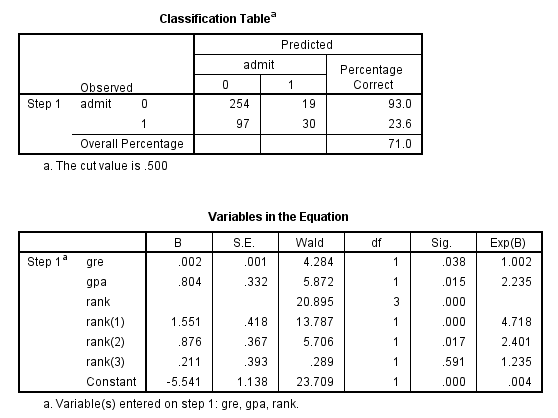
- In the table labeled Variables in the Equation we see the coefficients, their standard errors, the
Wald test statistic with associated degrees of freedom and p-values, and the
exponentiated coefficient (also known as an odds ratio). Both gre and gpa are statistically
significant. The overall (i.e., multiple degree of freedom) test for rank
is given first, followed by the terms for rank=1, rank=2, and rank=3.
The overall effect of rank is statistically significant, as are the terms
for rank=1 and rank=2. The logistic regression coefficients give the change in the log odds of the
outcome for a one unit increase in the predictor variable.- For every one unit change in gre, the log odds of
admission (versus non-admission) increases by 0.002. - For a one unit increase in gpa, the log odds of being admitted to graduate
school increases by 0.804. - The indicator variables for rank have a slightly different
interpretation. For example, having attended an undergraduate institution with rank of
1, versus an institution with a rank of 4,
increases the log odds of admission by 1.551.
- For every one unit change in gre, the log odds of
Things to consider
- Empty cells or small cells: You should check for empty or smallcells by doing a crosstab between categorical predictors and the outcome
variable. If a cell has very few cases (a small cell), the model may
become unstable or it might not run at all. - Separation or quasi-separation (also called perfect prediction), a
condition in which the outcome does not vary at some levels of the
independent variables. See our page
FAQ: What is complete or quasi-complete separation in logistic/probit
regression and how do we deal with them? for information on models with
perfect prediction. - Sample size: Both logit and probit models require more cases than
OLS regression because they use maximum likelihood estimation techniques. It is also important to keep in mind that
when the outcome is rare, even if the overall dataset is large, it can be
difficult to estimate a logit model. - Pseudo-R-squared: Many different measures of pseudo-R-squared
exist. They all attempt to provide information similar to that provided by
R-squared in OLS regression; however, none of them can be interpreted
exactly as R-squared in OLS regression is interpreted. For a discussion of
various pseudo-R-squareds see Long and Freese (2006) or our FAQ page
What are
pseudo R-squareds? - Diagnostics: The diagnostics for logistic regression are different
from those for OLS regression. For a discussion of model diagnostics for
logistic regression, see Hosmer and Lemeshow (2000, Chapter 5). Note that
diagnostics done for logistic regression are similar to those done for probit regression.
See also
- Annotated Output for Logistic Regression
- Textbook Example: Applied
Logistic Regression (2nd Edition) by David Hosmer and Stanley
Lemeshow - SPSS Frequently Asked Questions
- SPSS Code Fragments
- Stat Books for Loan, Logistic Regression and Limited Dependent Variables
References
- Hosmer, D. & Lemeshow, S. (2000). Applied Logistic Regression (Second Edition).New York: John Wiley & Sons, Inc.
- Long, J. Scott (1997). Regression Models for Categorical and Limited Dependent Variables.Thousand Oaks, CA: Sage Publications.